Golden Hour Pier Solitude — AI Image Prompt
Prompt
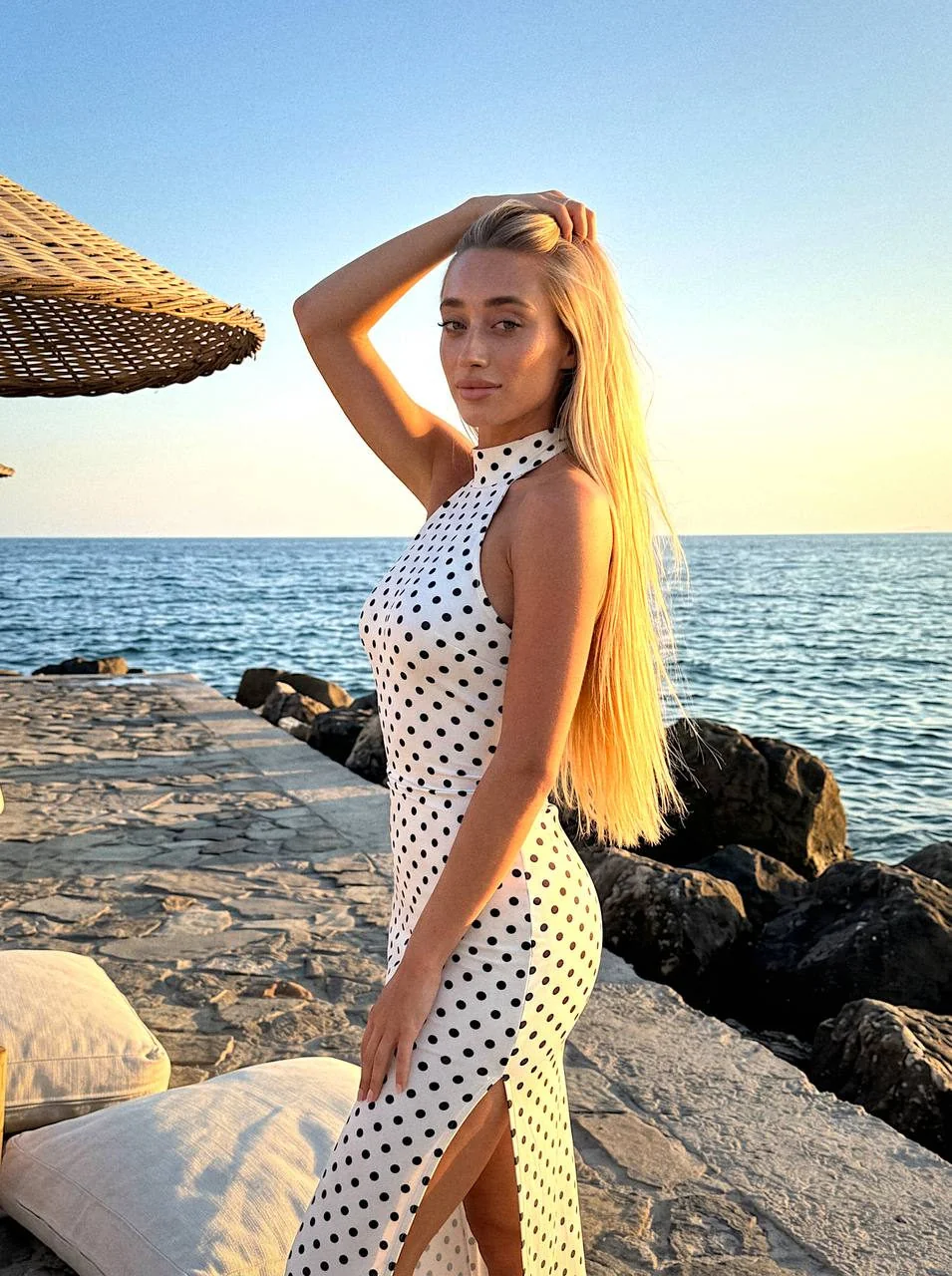
Preserve facial identity 100%, preserve facial features and hair color. Casual photo taken on a stone pier by the sea at sunset — candid, lifelike, unposed shot during a seaside vacation, natural amateur mobile phone photography during the golden hour. Subject: A woman with very long straight hair — hair is smooth, loose, falling over the shoulder and chest, illuminated by warm side-glowing sunset sun. One arm is raised and tucked behind the head, fingers touching the hair at the crown — the gesture raises the elbow, creating an elegant silhouette line. Face turned three-quarters to the camera, gaze directed straight into the lens, lips set in a slight confident semi-smile. Skin is tanned, with a warm blush from the sunset sun, makeup includes thick lash extensions and plump glossy lips. Wardrobe: Wearing a form-fitting milk-white midi dress with black polka dots, high stand-up collar, bare shoulders (halter-neck cut), sleeveless — the fabric fits tightly around the torso and hips, a slight slit on the side of the hem reveals part of the leg. Framing and Setting: Vertical frame, waist-up to full-body shot of a standing woman, camera angle is slightly from below — figure is positioned in the center of the frame, turned sideways with shoulders and face rotated toward the viewer. Standing on a wide concrete breakwater/pier by the seashore. On the left, the corner of a light woven straw beach umbrella is visible; at her feet is the edge of a white textile pouf or relaxation cushion. Behind and to the right are large dark breakwater boulders descending to the water. Background: Behind her opens a wide expanse of sea, extending to the horizon, with slight ripples on the water surface. The sky occupies the upper half of the frame — clear, clean, with a smooth transition from blue at the top to warm golden yellow at the horizon line where the sun is setting. Lighting: Warm sunset lighting, side and slightly backlit — the low sun creates a bright golden contour on the woman's hair and shoulder, softly illuminating the face and dress, casting long shadows from the stones. White balance is warm, the dress and skin take on a golden hue, while the sky and sea retain a clean, cool, slightly bluish color in the upper part of the frame, creating a pleasant contrast. Technical: Background is strictly sharp, no blur. Shot on iPhone 17 Pro.
About “Golden Hour Pier Solitude”
This photorealistic, portrait AI image prompt was created by PromptSpace and is available to copy and use for free on PromptSpace. At 401 words, this is a detailed prompt that gives AI models precise instructions for generating the exact image you envision. It falls under the realistic, photography, portrait categories.
How to Use This Prompt
- 1
Copy the prompt
Click the “Copy Prompt” button above to copy the full prompt text to your clipboard.
- 2
Open your AI image generator
Open FLUX, Midjourney and paste the prompt into the text field.
- 3
Generate your image
Hit generate. For best results, use the default settings first and see how the output looks.
- 4
Experiment with variations
Change details like colors, lighting, or composition to make it uniquely yours.
- 5
Want your own face in the image?
Upload a clear, well-lit front-facing photo of yourself directly inside your AI tool (look for Image Reference, Face Swap, or IP-Adapter options) — then paste this prompt alongside it to generate images with your own face.
Recommended Settings
Aspect Ratio
2:3 (Portrait)
Quality
High / HD
Best For
FLUX, Midjourney
Style
Photorealistic, Portrait
Why This Prompt Works
The high word count gives the model rich context, reducing ambiguity and producing more consistent results. The photorealistic and portrait aesthetic signals are specific enough that the model can lock onto a distinct visual language. Explicit lighting direction (a leading signal in prompt engineering) significantly improves photo-realism and composition. Well-crafted prompts like this one combine subject precision, style vocabulary, and rendering hints — the three pillars of reliable AI image generation.
Best Model
FLUX is strongly recommended for this prompt. FLUX 1.1 Pro excels at photorealism and handles complex lighting instructions more accurately than older models.
Common Failure Modes
Face distortion is the most common issue — enable 'face fix' or use --no deformed faces in Midjourney. Hands may also look unnatural; add 'perfect hands, detailed fingers' if body is included.
Prompt Variations to Try
- 1Cinematic version: Add "golden hour lighting, anamorphic lens, shallow depth of field, film grain" to shift the mood toward a movie still.
- 2Commercial-safe version: Replace stylized terms with "clean, minimalist, white background, product photography style" for brand or e-commerce use.
- 3Night version: Add "nighttime, neon lights, city reflections, low-light photography, f/1.4 aperture" to shift to night photography aesthetics.
Related Categories
This prompt is tagged with realistic, photography, portrait, day. Browse more prompts in these categories to find similar AI art styles and inspiration for your next creation.