Minimalist Graphite Intimacy — AI Image Prompt
Prompt
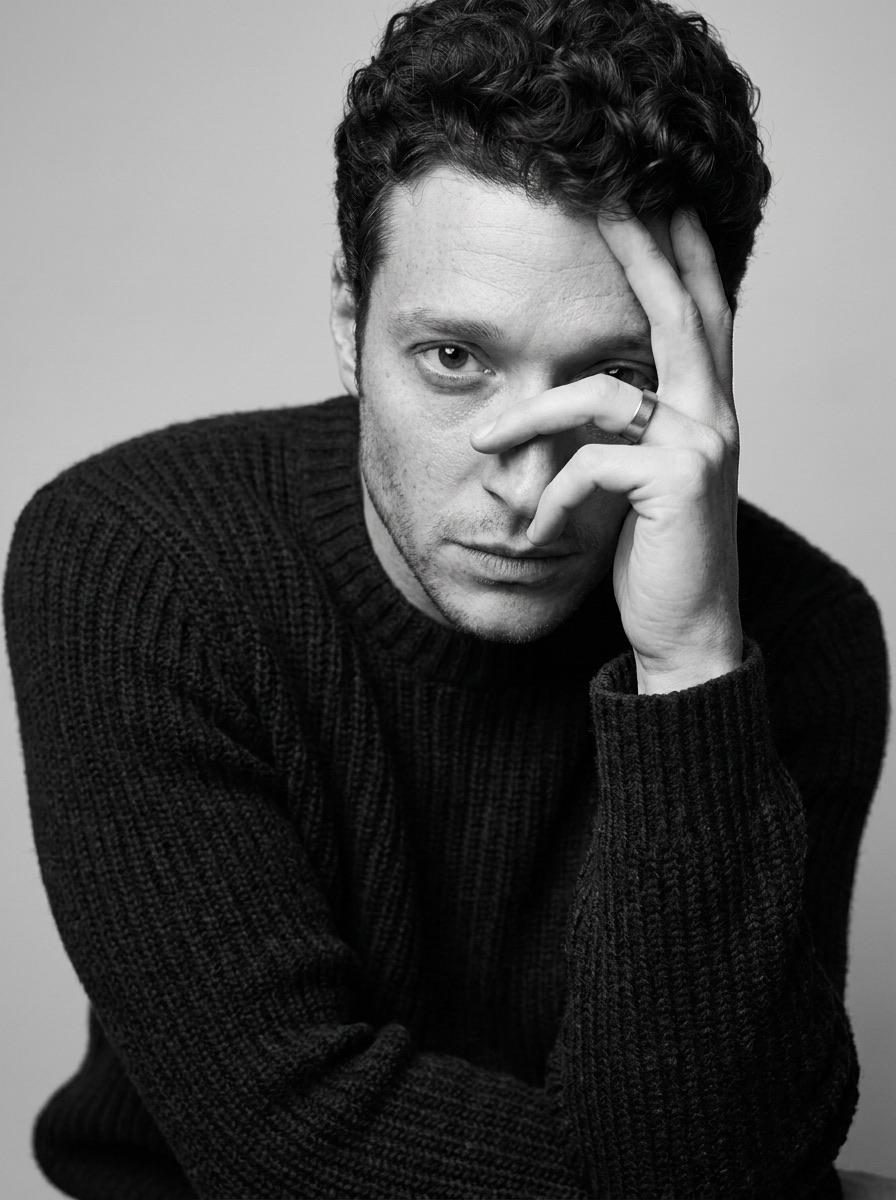
The man is photographed in a close-up, emotional portrait, his body slightly tilted forward, one hand raised to his face and partially covering his eye, his fingers forming a graphic line around his face, his gaze directed directly at the lens. The portrait is close-up, from chest to head, with an eye-level angle. The composition is tight and minimalist, with the main emphasis on the face and hand gesture. He is wearing a voluminous, ribbed wool knit sweater with a distinctly textured matte surface in a dark graphite shade (#2f2f2f). The knit texture is clearly visible and plays a key role in the frame. A matte metal ring on his hand serves as a minimal accent. The location is a minimalist studio backdrop in a light gray shade (#d9d9d6); the surface is smooth, free of details and distracting objects. The lighting is soft and directional, with a large, diffused light positioned to the side and slightly above, creating a sculpted volume on the face and soft shadows. The contrast is medium, and the shadows are smooth, without harsh transitions. The lighting is perfectly coordinated, classic studio editorial. Shot with an 85mm portrait lens, shallow depth of field, sharp focus on the open eye and face, the hand remains detailed, and the background fades softly. Highly detailed skin, hair, and knit textures. Monochrome editorial portrait, highly detailed, photorealistic. Intimate monochrome editorial mood, soft grayscale tonal palette, low saturation black and white treatment, diffused studio lighting, medium contrast, soft shadow transitions, gentle highlight rolloff, fine visible grain texture, subtle film softness, classic monochrome fashion grading.
✦ Use this prompt for free
About “Minimalist Graphite Intimacy”
This photorealistic, fashion, portrait AI image prompt was created by AdX and is available to copy and use for free on PromptSpace. At 263 words, this is a detailed prompt that gives AI models precise instructions for generating the exact image you envision. It falls under the realistic, portrait, studio categories.
How to Use This Prompt
- 1
Copy the prompt
Click the “Copy Prompt” button above to copy the full prompt text to your clipboard.
- 2
Open your AI image generator
Open FLUX, Midjourney and paste the prompt into the text field.
- 3
Generate your image
Hit generate. For best results, use the default settings first and see how the output looks.
- 4
Experiment with variations
Change details like colors, lighting, or composition to make it uniquely yours.
- 5
Want your own face in the image?
Upload a clear, well-lit front-facing photo of yourself directly inside your AI tool (look for Image Reference, Face Swap, or IP-Adapter options) — then paste this prompt alongside it to generate images with your own face.
Recommended Settings
Aspect Ratio
2:3 (Portrait)
Quality
High / HD
Best For
FLUX, Midjourney
Style
Photorealistic, Fashion, Portrait
Why This Prompt Works
The high word count gives the model rich context, reducing ambiguity and producing more consistent results. The photorealistic and fashion aesthetic signals are specific enough that the model can lock onto a distinct visual language. Explicit lighting direction (a leading signal in prompt engineering) significantly improves photo-realism and composition. Well-crafted prompts like this one combine subject precision, style vocabulary, and rendering hints — the three pillars of reliable AI image generation.
Best Model
FLUX is strongly recommended for this prompt. FLUX 1.1 Pro excels at photorealism and handles complex lighting instructions more accurately than older models.
Common Failure Modes
Face distortion is the most common issue — enable 'face fix' or use --no deformed faces in Midjourney. Hands may also look unnatural; add 'perfect hands, detailed fingers' if body is included.
Prompt Variations to Try
- 1Cinematic version: Add "golden hour lighting, anamorphic lens, shallow depth of field, film grain" to shift the mood toward a movie still.
- 2Commercial-safe version: Replace stylized terms with "clean, minimalist, white background, product photography style" for brand or e-commerce use.
- 3Night version: Add "nighttime, neon lights, city reflections, low-light photography, f/1.4 aperture" to shift to night photography aesthetics.
Related Categories
This prompt is tagged with realistic, portrait, studio, minimalist, fashion. Browse more prompts in these categories to find similar AI art styles and inspiration for your next creation.