Cold Terminal Authority — AI Image Prompt
Prompt
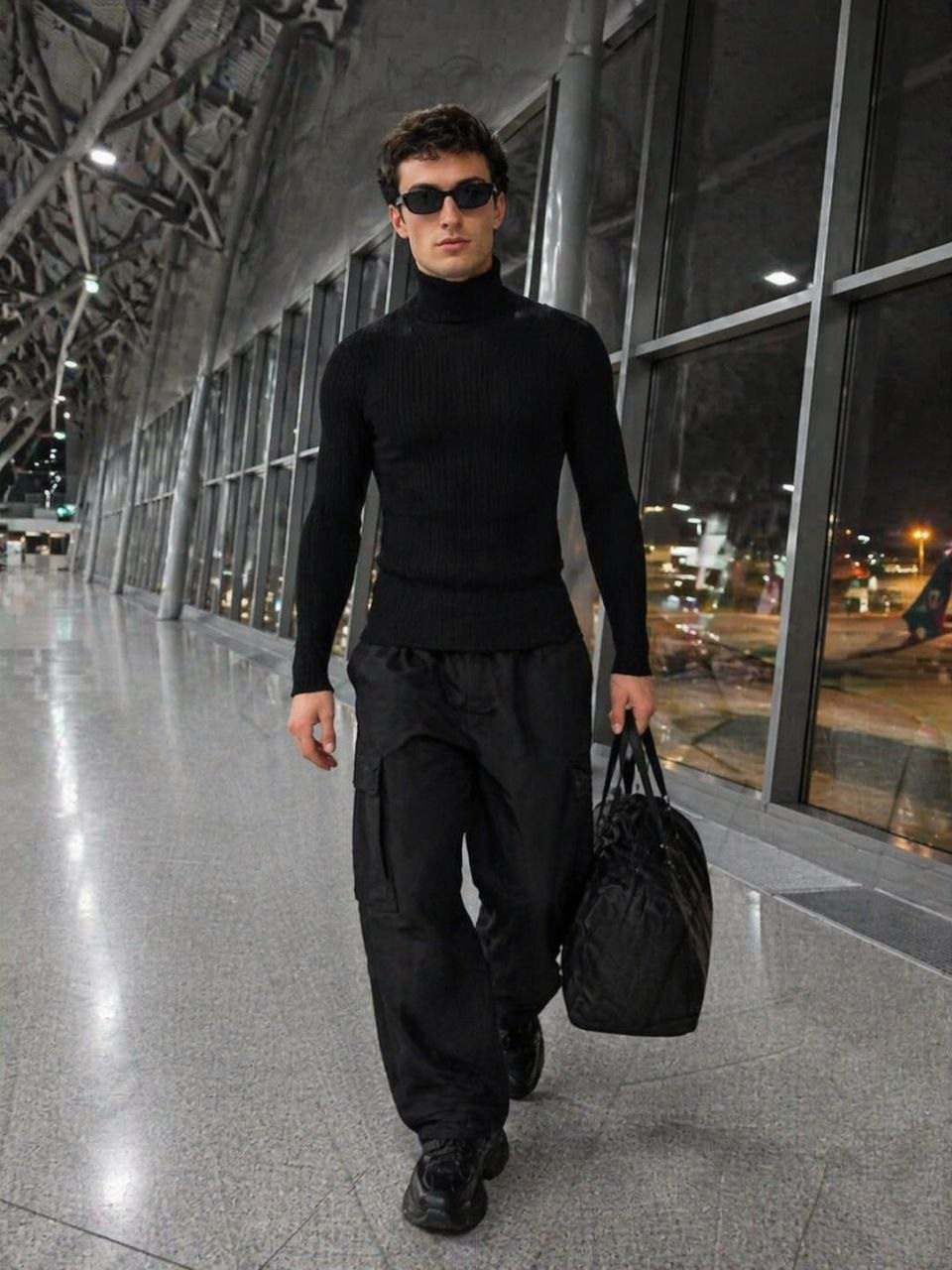
[SUBJECT — мужчина] идёт прямо на камеру по коридору терминала аэропорта. Камера расположена немного снизу (~25°), создавая вытянутую перспективу — потолок и конструкции уходят вверх. Полный рост в кадре. Взгляд направлен прямо в объектив — уверенный, холодный. Подбородок слегка приподнят. Правая рука свободно опущена вдоль тела, левая держит чёрную дорожную сумку (дафл-бэг) за ручку. Одежда: спортивный editorial образ — облегающая чёрная водолазка из плотного рибированного трикотажа. Широкие брюки карго из технической ткани чёрного цвета с накладными карманами. Массивные чёрные кроссовки на chunky подошве. Узкие прямоугольные чёрные солнцезащитные очки. Локация: широкий коридор выхода на гейт в аэропорту. Панорамные окна от пола до потолка, за ними тёмное поле с самолётами на перроне, вдалеке огни взлётной полосы. Металлические конструкции потолка уходят в перспективу. Пол из серого полированного камня с лёгким отражением фигуры. Пространство почти пустое. Освещение: холодный флуоресцентный свет ~6000K, равномерный сверху. Тёплые огни самолётов за окнами создают контраст с холодным интерьером. Экспозиция -0.5, контрастный cinematic тонинг. Эстетика: натуральное зерно iPhone, без AI glow, без beauty-фильтров, без пластиковой кожи. Максимально реалистичная текстура. Избегать деформаций, лишних пальцев, слияния пальцев, искажений лица, мутированных форм.
✦ Use this prompt for free
About “Cold Terminal Authority”
This photorealistic, cinematic, fashion AI image prompt was created by AdX and is available to copy and use for free on PromptSpace. At 179 words, this is a detailed prompt that gives AI models precise instructions for generating the exact image you envision. It falls under the realistic, cinematic, fashion categories.
How to Use This Prompt
- 1
Copy the prompt
Click the “Copy Prompt” button above to copy the full prompt text to your clipboard.
- 2
Open your AI image generator
Open FLUX, Midjourney and paste the prompt into the text field.
- 3
Generate your image
Hit generate. For best results, use the default settings first and see how the output looks.
- 4
Experiment with variations
Change details like colors, lighting, or composition to make it uniquely yours.
- 5
Want your own face in the image?
Upload a clear, well-lit front-facing photo of yourself directly inside your AI tool (look for Image Reference, Face Swap, or IP-Adapter options) — then paste this prompt alongside it to generate images with your own face.
Recommended Settings
Aspect Ratio
2:3 (Portrait)
Quality
High / HD
Best For
FLUX, Midjourney
Style
Photorealistic, Cinematic, Fashion
Why This Prompt Works
The high word count gives the model rich context, reducing ambiguity and producing more consistent results. The photorealistic and cinematic aesthetic signals are specific enough that the model can lock onto a distinct visual language. The cinematic framing instruction tells the model to treat composition and depth-of-field as a film director would, not as a snapshot. Well-crafted prompts like this one combine subject precision, style vocabulary, and rendering hints — the three pillars of reliable AI image generation.
Best Model
FLUX is strongly recommended for this prompt. FLUX 1.1 Pro excels at photorealism and handles complex lighting instructions more accurately than older models.
Common Failure Modes
Over-saturation and excessive HDR effects can make cinematic prompts look artificial. Add 'natural color grading, subtle tones' to avoid the 'AI look'. Also watch for lens-flare overuse.
Prompt Variations to Try
- 1Cinematic version: Add "golden hour lighting, anamorphic lens, shallow depth of field, film grain" to shift the mood toward a movie still.
- 2Commercial-safe version: Replace stylized terms with "clean, minimalist, white background, product photography style" for brand or e-commerce use.
- 3Night version: Add "nighttime, neon lights, city reflections, low-light photography, f/1.4 aperture" to shift to night photography aesthetics.
Related Categories
This prompt is tagged with realistic, cinematic, fashion, night, dark moody. Browse more prompts in these categories to find similar AI art styles and inspiration for your next creation.