Bosphorus Wine Elegance — AI Image Prompt
Prompt
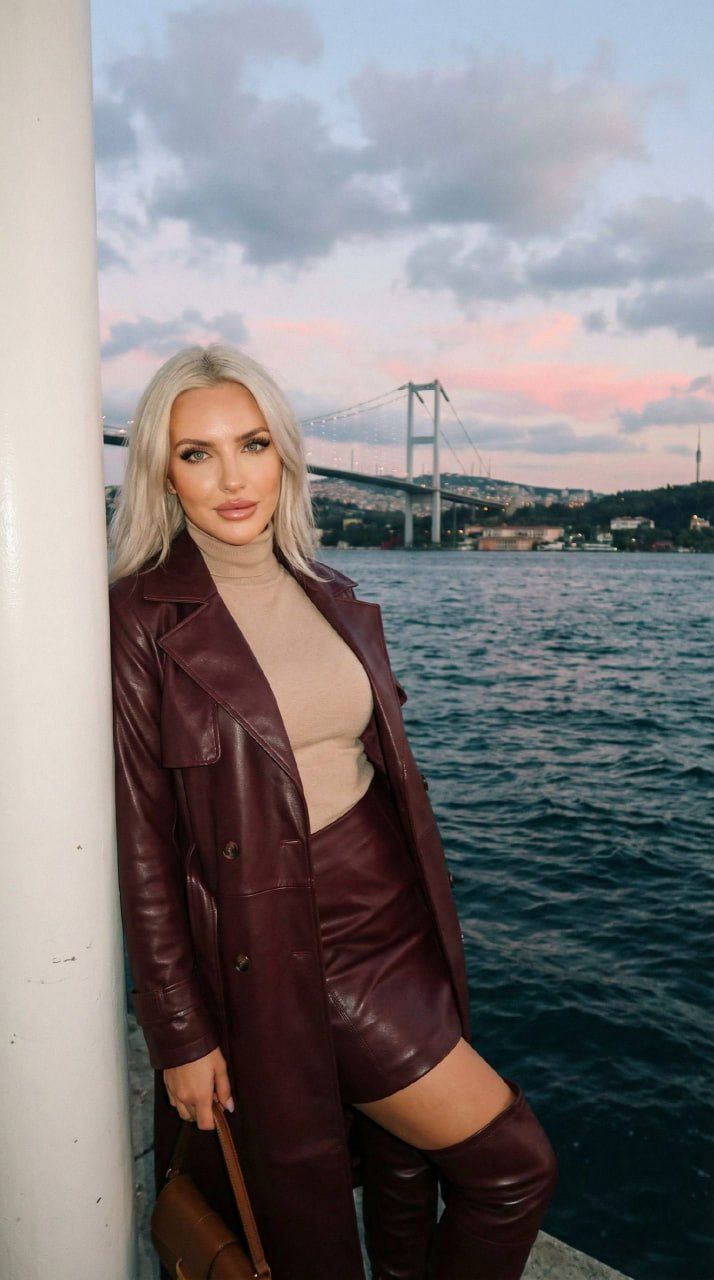
Create a photorealistic image of a girl. Background: a recognizable landscape of Istanbul at twilight: Bosphorus Bridge (July 15 Martyrs Bridge): A huge suspension bridge connecting Europe and Asia, stretching over the restless waters of the strait. Sky: Evening and overcast, colored in cold blue tones with light pink reflections of the sunset at the horizon. Coastline: In the distance, the hills of the Asian part of the city are visible, dotted with building lights. Water: Dark blue, swirling waves of the Bosphorus with white crests of foam that emphasize the windy weather. Pose: the model poses leaning her back against a massive white column. Left hand: Bent at the elbow, the hand holds a small brown bag resting on her left hip. Right hand: Freely lowered along the body. Legs: Shoulder-width apart. Head: The model holds her head straight, looking into the lens. Angle: Shot slightly from the bottom up (frontally), which visually lengthens the silhouette and makes the pose more majestic. Lighting: Hard frontal lighting used, likely from a direct flash. Look: Monochrome outfit in a deep wine (burgundy) color. Top: Long leather coat of a loose fit, draped over the shoulders, and a beige turtleneck. Bottom: Leather mini-skirt in the tone of the coat. Shoes: High leather over-the-knee boots with heels and a pointed toe. Appearance: thickly painted eyelashes, full lips, dusty green eyes. Long nails, dark brown color, in the shape of a ballerina. hair styled in soft natural waves with a straight parting. Photorealism, high detail of skin, fabric and props. Photo in motion. Shot quality like iPhone 5 — light digital noise, soft sharpness, muted colors, light grain, live frame effect.
✦ Use this prompt for free
About “Bosphorus Wine Elegance”
This photorealistic, fashion, portrait AI image prompt was created by AdX and is available to copy and use for free on PromptSpace. At 277 words, this is a detailed prompt that gives AI models precise instructions for generating the exact image you envision. It falls under the realistic, fashion, photography categories.
How to Use This Prompt
- 1
Copy the prompt
Click the “Copy Prompt” button above to copy the full prompt text to your clipboard.
- 2
Open your AI image generator
Open FLUX, Midjourney and paste the prompt into the text field.
- 3
Generate your image
Hit generate. For best results, use the default settings first and see how the output looks.
- 4
Experiment with variations
Change details like colors, lighting, or composition to make it uniquely yours.
- 5
Want your own face in the image?
Upload a clear, well-lit front-facing photo of yourself directly inside your AI tool (look for Image Reference, Face Swap, or IP-Adapter options) — then paste this prompt alongside it to generate images with your own face.
Recommended Settings
Aspect Ratio
2:3 (Portrait)
Quality
High / HD
Best For
FLUX, Midjourney
Style
Photorealistic, Fashion, Portrait
Why This Prompt Works
The high word count gives the model rich context, reducing ambiguity and producing more consistent results. The photorealistic and fashion aesthetic signals are specific enough that the model can lock onto a distinct visual language. Explicit lighting direction (a leading signal in prompt engineering) significantly improves photo-realism and composition. Well-crafted prompts like this one combine subject precision, style vocabulary, and rendering hints — the three pillars of reliable AI image generation.
Best Model
FLUX is strongly recommended for this prompt. FLUX 1.1 Pro excels at photorealism and handles complex lighting instructions more accurately than older models.