Divided Reality Rupture — AI Image Prompt
Prompt
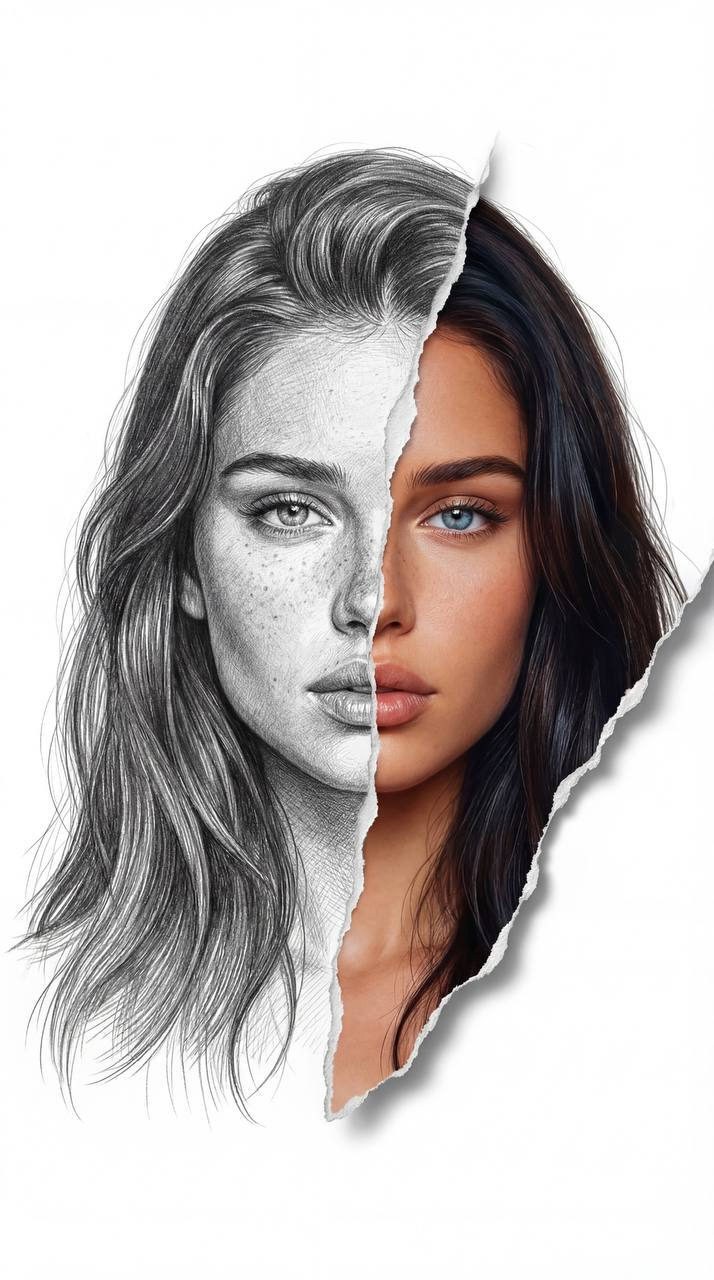
Use the downloaded photo reference and fully preserve the exact facial features of the model, proportions, bone structure, shape of the eyes, nose, lips, skin tone and individuality without changes. The face should remain fully recognisable and photorealistic. Create a museum-quality portrait in graphite and mixed technique, a centred composition on a perfectly white background. The left half of the model’s face is made entirely in an ultra-detailed graphite pencil. You can see soft layered hatching, delicate cross hatching on the skin and hair. Keep the natural details of the skin - freckles, pores, tonal transitions - in graphite interpretation. The hair on the graphite side is neatly drawn in thin separate strands with smooth tone transitions, exactly repeating the real hairstyle of the model. The face is divided in the centre by a dramatic vertical rupture of the paper. Through the gap, the right half of the face is revealed in a hyperrealistic colour, while the similarity with the model from the reference is completely preserved. The eye on the coloured side should correspond to the real eye colour of the model, with high iris detail, natural glare and depth. The skin on the coloured side is smooth but realistic, with natural halftones and light warmth. The lips are natural, corresponding to the model. Real strands of hair come out through the paper tear. The edges of the torn paper are textured, slightly bent, cast soft realistic shadows on a white background, creating a feeling of volume and depth. Strong contrast between monochrome and colour. Ultra-realism fine art. High resolution. Maximum sharpness. Professional studio lighting. 8K detail. Without cartoonisation and without changing the proportions of the face.
✦ Use this prompt for free
About “Divided Reality Rupture”
This photorealistic, portrait, artistic AI image prompt was created by AdX and is available to copy and use for free on PromptSpace. At 278 words, this is a detailed prompt that gives AI models precise instructions for generating the exact image you envision. It falls under the realistic, portrait, sketch line art categories.
How to Use This Prompt
- 1
Copy the prompt
Click the “Copy Prompt” button above to copy the full prompt text to your clipboard.
- 2
Open your AI image generator
Open FLUX, Midjourney and paste the prompt into the text field.
- 3
Generate your image
Hit generate. For best results, use the default settings first and see how the output looks.
- 4
Experiment with variations
Change details like colors, lighting, or composition to make it uniquely yours.
- 5
Want your own face in the image?
Upload a clear, well-lit front-facing photo of yourself directly inside your AI tool (look for Image Reference, Face Swap, or IP-Adapter options) — then paste this prompt alongside it to generate images with your own face.
Recommended Settings
Aspect Ratio
2:3 (Portrait)
Quality
High / HD
Best For
FLUX, Midjourney
Style
Photorealistic, Portrait, Artistic
Why This Prompt Works
The high word count gives the model rich context, reducing ambiguity and producing more consistent results. The photorealistic and portrait aesthetic signals are specific enough that the model can lock onto a distinct visual language. Explicit lighting direction (a leading signal in prompt engineering) significantly improves photo-realism and composition. Well-crafted prompts like this one combine subject precision, style vocabulary, and rendering hints — the three pillars of reliable AI image generation.
Best Model
FLUX is strongly recommended for this prompt. FLUX 1.1 Pro excels at photorealism and handles complex lighting instructions more accurately than older models.