Aggressive Urban Collage — AI Image Prompt
Prompt
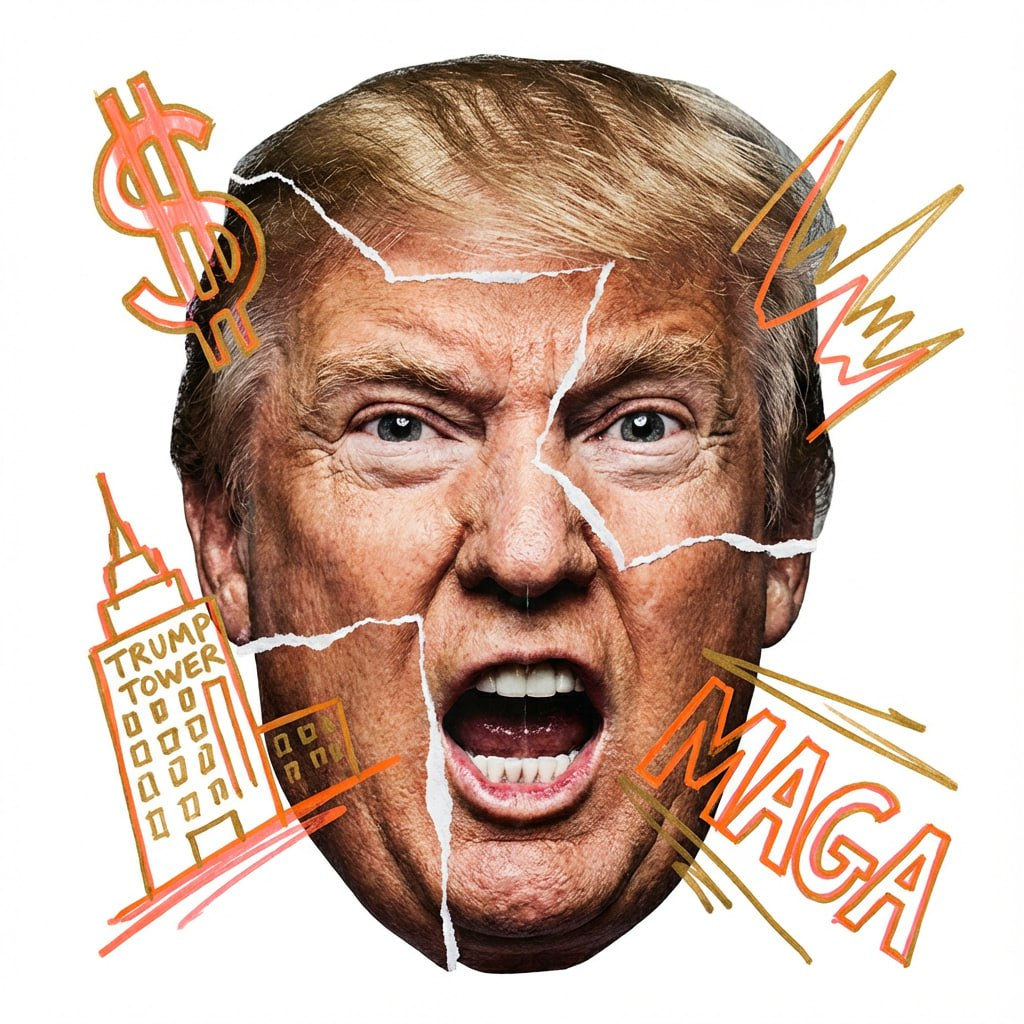
Act as a modern mixed-media artist creating a raw, aggressive urban collage portrait. 1. SUBJECT (AGGRESSIVE COLLAGE & EMOTIONS): Create a hyper-realistic caricature of [NAME] with a large head, created using aggressive photomontage. Facial expression (high energy): The subject should have a visceral, highly emotionally charged expression (e.g., loud laughter, primal scream, focused growl, manic wide-eyed stare). No passive or neutral faces. "Raw cutout" technique (CRITICAL): The face is not a solid photograph. It's a rough assembly of mismatched parts taken from different sources. You must show the rough, jagged white paper tear lines and seams where the eyes, mouth, and forehead overlap and are taped together. Edges should look analog, handmade, and imperfect, like torn magazine pages. 2. "GRAFFITI EXPLOSION" (THOUGHTFUL CONTENT & DYNAMIC PLACEMENT): Apply whimsical hand-drawn neon marker drawings over the collage. Color and content logic (automatic): Define a signature color AND 2-3 iconic symbols/logos associated with [NAME]. Draw these specific symbols crudely in neon color. PLACEMENT (CROSSING THE BORDER): Drawing elements should not be inside the face. They should dynamically flare outward, breaking the silhouette of the head and expanding sharply into the surrounding white negative space. 3. PHOTOGRAPHY, LIGHTING AND TEXTURE: Style: Raw street art meets high-end photography. Texture: Emphasize the tactile mix of materials: the glossy texture of photopaper, the fibrous texture of torn white edges, and the waxy texture of the neon marker. Lighting: Harsh, high-contrast studio lighting that casts sharp shadows, emphasizing the layering of the paper cuts. 4. COMPOSITION: Framing: Photographic head is centered, but the composition feels chaotic due to scattered scribbles. Background: Pure white (#FFFFFF). Clean, flat, no texture, providing maximum contrast for the messy collage.
✦ Use this prompt for free
About “Aggressive Urban Collage”
This photorealistic AI image prompt was created by AdX and is available to copy and use for free on PromptSpace. At 277 words, this is a detailed prompt that gives AI models precise instructions for generating the exact image you envision. It falls under the realistic, studio, modern categories.
How to Use This Prompt
- 1
Copy the prompt
Click the “Copy Prompt” button above to copy the full prompt text to your clipboard.
- 2
Open your AI image generator
Open FLUX, Midjourney and paste the prompt into the text field.
- 3
Generate your image
Hit generate. For best results, use the default settings first and see how the output looks.
- 4
Experiment with variations
Change details like colors, lighting, or composition to make it uniquely yours.
- 5
Want your own face in the image?
Upload a clear, well-lit front-facing photo of yourself directly inside your AI tool (look for Image Reference, Face Swap, or IP-Adapter options) — then paste this prompt alongside it to generate images with your own face.
Recommended Settings
Aspect Ratio
1:1 or 2:3 (Default)
Quality
High / HD
Best For
FLUX, Midjourney
Style
Photorealistic
Why This Prompt Works
The high word count gives the model rich context, reducing ambiguity and producing more consistent results. The photorealistic aesthetic signals are specific enough that the model can lock onto a distinct visual language. Explicit lighting direction (a leading signal in prompt engineering) significantly improves photo-realism and composition. Well-crafted prompts like this one combine subject precision, style vocabulary, and rendering hints — the three pillars of reliable AI image generation.
Best Model
FLUX is strongly recommended for this prompt. FLUX 1.1 Pro excels at photorealism and handles complex lighting instructions more accurately than older models.