Woman Portrait — AI Image Prompt
Prompt
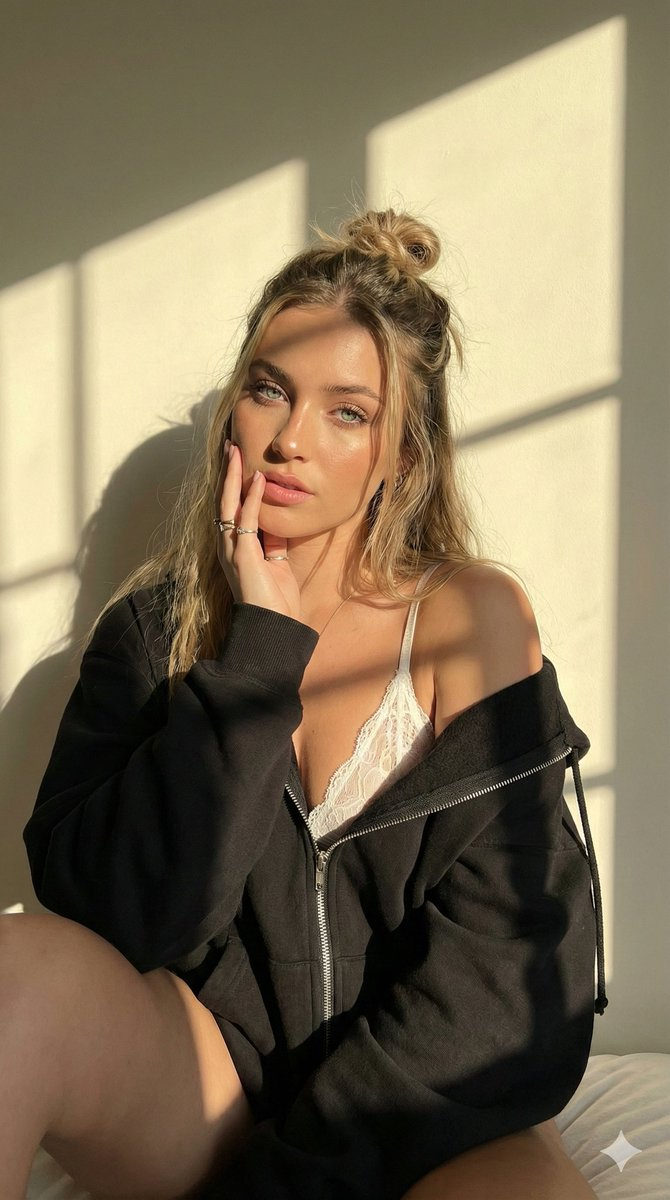
{ "image_generation_settings": { "aspect_ratio": "9:16", "width": 2160, "height": 3840, "quality": "highest", "style_preset": "photographic" }, "prompt_structure": { "subject": { "main_character": "beautiful young woman with shoulder-length dirty blonde hair in a half-up half-down messy bun style", "facial_features": "piercing blue-green eyes full lips glowing skin with natural makeup", "clothing": "oversized black zip-up hoodie worn off the shoulders revealing a white lace bralette or camisole underneath", "pose": "seated close-up portrait knees bent up one hand gently touching face near eye looking directly at camera with alluring expression" }, "environment": { "location": "indoor studio setting", "background_elements": "plain cream or white wall with strong geometric shadow lines", "lighting_context": "golden hour sunset light striking the face and body creating high contrast between light and shadow" }, "technical_specs": { "resolution": "8k uhd", "quality": "ultra realistic hdr", "lighting": "warm direct sunlight sharp shadows cinematic lighting", "camera_shot": "intimate portrait sharp focus on eyes highly detailed skin texture" } }, "final_prompt_string": "Ultra realistic 8k uhd hdr portrait of a beautiful young woman with dirty blonde half-up hair and piercing blue eyes sitting against a white wall, wearing an off-shoulder black hoodie and white lace bralette, hand touching face, intense golden hour sunlight casting sharp geometric shadows across her face and the background, glowing skin texture, cinematic lighting, vertical format --ar 9:16 --stylize 750" }
✦ Use this prompt for free
About “Woman Portrait”
This photorealistic, cinematic, portrait AI image prompt was created by @TAB_TAB_HH and is available to copy and use for free on PromptSpace. At 213 words, this is a detailed prompt that gives AI models precise instructions for generating the exact image you envision. It falls under the realistic, cinematic, portrait categories.
How to Use This Prompt
- 1
Copy the prompt
Click the “Copy Prompt” button above to copy the full prompt text to your clipboard.
- 2
Open your AI image generator
Open Midjourney, FLUX and paste the prompt into the text field.
- 3
Generate your image
Hit generate. For best results, use the default settings first and see how the output looks.
- 4
Experiment with variations
Change details like colors, lighting, or composition to make it uniquely yours.
- 5
Want your own face in the image?
Upload a clear, well-lit front-facing photo of yourself directly inside your AI tool (look for Image Reference, Face Swap, or IP-Adapter options) — then paste this prompt alongside it to generate images with your own face.
Recommended Settings
Aspect Ratio
2:3 (Portrait)
Quality
High / HD
Best For
Midjourney, FLUX
Style
Photorealistic, Cinematic, Portrait
Why This Prompt Works
The high word count gives the model rich context, reducing ambiguity and producing more consistent results. The photorealistic and cinematic aesthetic signals are specific enough that the model can lock onto a distinct visual language. Explicit lighting direction (a leading signal in prompt engineering) significantly improves photo-realism and composition. Well-crafted prompts like this one combine subject precision, style vocabulary, and rendering hints — the three pillars of reliable AI image generation.
Best Model
Midjourney is strongly recommended for this prompt. Midjourney v6 handles the stylized aesthetic especially well. Try --ar 2:3 and --style raw for the most faithful output.