Fashion Photography — AI Image Prompt
Prompt
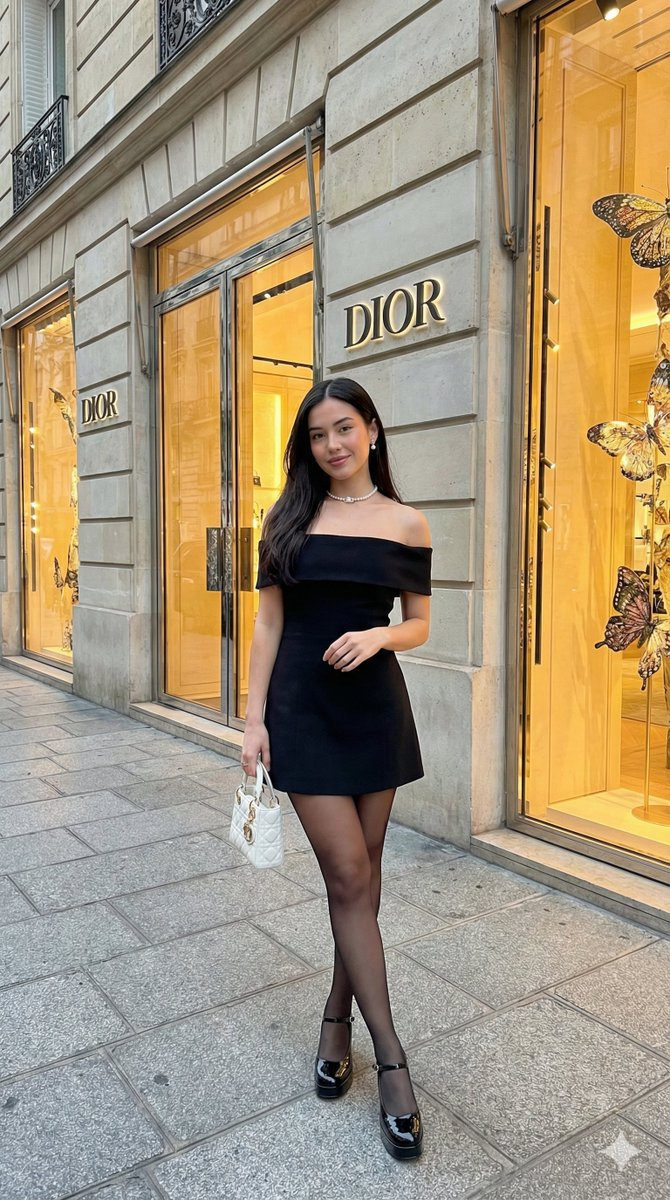
{"prompt_description":"High-end fashion photography of a young woman standing in front of a luxury Dior storefront.","subject":{"appearance":"Young woman with a slim figure and light skin tone.","hair":"Long, straight black hair, center-parted, resting over shoulders.","expression":"Soft, confident smile with direct eye contact.","pose":"Full-body standing fashion pose, crossing legs slightly at the ankles."},"attire":{"dress":"Black off-the-shoulder mini dress featuring a structured bodice with a folded neckline and a flared, pleated skater-style skirt.","legwear":"Sheer black pantyhose.","footwear":"Glossy black platform high heels with ankle straps (Mary Jane style)."},"accessories":{"jewelry":"White pearl choker necklace and small pearl stud earrings.","handbag":"Small, white quilted luxury handbag (resembling a Lady Dior bag) held in the left hand."},"environment":{"location":"Exterior of a luxury boutique in Paris.","architecture":"Classic light grey stone facade with decorative moldings.","branding":"Metallic 'DIOR' signage mounted on the wall.","storefront_display":"Large glass windows filled with elaborate, glowing golden decorations featuring butterflies and branches.","ground":"Clean, grey paved sidewalk."},"technical_details":{"style":"Photorealistic, street style fashion photography.","lighting":"Soft natural daylight mixed with warm, golden ambient lighting radiating from the shop windows.","composition":"Eye-level shot, centered subject, depth of field keeping the background detailed but slightly softer than the subject."}}
✦ Use this prompt for free
About “Fashion Photography”
This photorealistic, fashion AI image prompt was created by @xIrissy and is available to copy and use for free on PromptSpace. At 164 words, this is a detailed prompt that gives AI models precise instructions for generating the exact image you envision. It falls under the fashion, photography, realistic categories.
How to Use This Prompt
- 1
Copy the prompt
Click the “Copy Prompt” button above to copy the full prompt text to your clipboard.
- 2
Open your AI image generator
Open FLUX, Midjourney and paste the prompt into the text field.
- 3
Generate your image
Hit generate. For best results, use the default settings first and see how the output looks.
- 4
Experiment with variations
Change details like colors, lighting, or composition to make it uniquely yours.
- 5
Want your own face in the image?
Upload a clear, well-lit front-facing photo of yourself directly inside your AI tool (look for Image Reference, Face Swap, or IP-Adapter options) — then paste this prompt alongside it to generate images with your own face.
Recommended Settings
Aspect Ratio
2:3 (Portrait)
Quality
High / HD
Best For
FLUX, Midjourney
Style
Photorealistic, Fashion
Why This Prompt Works
The high word count gives the model rich context, reducing ambiguity and producing more consistent results. The photorealistic and fashion aesthetic signals are specific enough that the model can lock onto a distinct visual language. Explicit lighting direction (a leading signal in prompt engineering) significantly improves photo-realism and composition. Well-crafted prompts like this one combine subject precision, style vocabulary, and rendering hints — the three pillars of reliable AI image generation.
Best Model
FLUX is strongly recommended for this prompt. FLUX 1.1 Pro excels at photorealism and handles complex lighting instructions more accurately than older models.