Hand Photobooth — AI Image Prompt
Prompt
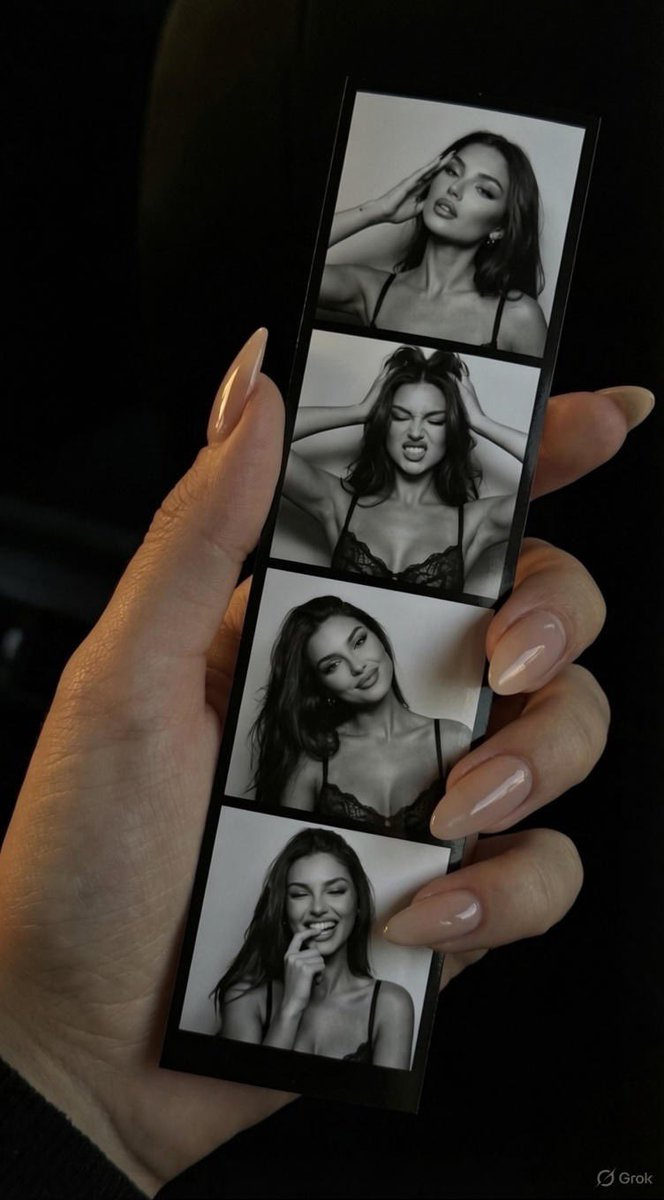
{ "image_description": { "subject": "Close-up of a female hand holding a vertical photobooth strip", "hand_details": { "skin_tone": "fair to light tan", "nails": { "shape": "long almond/oval", "color": "nude beige", "finish": "high gloss/gel", "appearance": "elegant, well-manicured" }, "clothing": "slight glimpse of a black sleeve cuff at the wrist", "lighting": "soft warm illumination highlighting the knuckles and nail gloss" }, "object": { "type": "photobooth strip", "format": "vertical column with 4 frames", "color_scheme": "black and white photos with black borders", "subject_in_photos": "young woman with long dark hair, winged eyeliner, and a lace spaghetti-strap top" }, "photobooth_frames": [ { "position": "1 (Top)", "pose": "hand resting against temple/hair", "expression": "sultry, glamorous, looking slightly away", "vibe": "fashion editorial" }, { "position": "2", "pose": "both hands lifting hair up", "expression": "playful scrunched nose/grimace, eyes closed or squinting", "vibe": "silly, energetic" }, { "position": "3", "pose": "head tilted to the side, hair loose", "expression": "soft, charming smile looking at camera", "vibe": "sweet, portrait" }, { "position": "4 (Bottom)", "pose": "biting thumb/finger", "expression": "flirty, playful smile", "vibe": "candid, fun" } ], "background": { "setting": "dark, undefined space (likely inside a car or dimly lit room)", "lighting": "low key, high contrast, focus remains entirely on the hand and strip", "depth_of_field": "shallow, background is blurred into a black void" }, "style": { "aesthetic": "moody, trendy, 'Pinterest' aesthetic, personal photography", "composition": "first-person perspective (POV)" } } }
✦ Use this prompt for free
About “Hand Photobooth”
This AI image prompt was created by @xIrissy and is available to copy and use for free on PromptSpace. At 225 words, this is a detailed prompt that gives AI models precise instructions for generating the exact image you envision.
How to Use This Prompt
- 1
Copy the prompt
Click the “Copy Prompt” button above to copy the full prompt text to your clipboard.
- 2
Open your AI image generator
Open FLUX, Midjourney and paste the prompt into the text field.
- 3
Generate your image
Hit generate. For best results, use the default settings first and see how the output looks.
- 4
Experiment with variations
Change details like colors, lighting, or composition to make it uniquely yours.
- 5
Want your own face in the image?
Upload a clear, well-lit front-facing photo of yourself directly inside your AI tool (look for Image Reference, Face Swap, or IP-Adapter options) — then paste this prompt alongside it to generate images with your own face.
Recommended Settings
Aspect Ratio
1:1 or 2:3 (Default)
Quality
High / HD
Best For
FLUX, Midjourney
Style
As described in prompt
Why This Prompt Works
The high word count gives the model rich context, reducing ambiguity and producing more consistent results. Explicit lighting direction (a leading signal in prompt engineering) significantly improves photo-realism and composition. Well-crafted prompts like this one combine subject precision, style vocabulary, and rendering hints — the three pillars of reliable AI image generation.
Best Model
FLUX is strongly recommended for this prompt. FLUX 1.1 Pro excels at photorealism and handles complex lighting instructions more accurately than older models.