Retro Vice Rebellion — AI Image Prompt
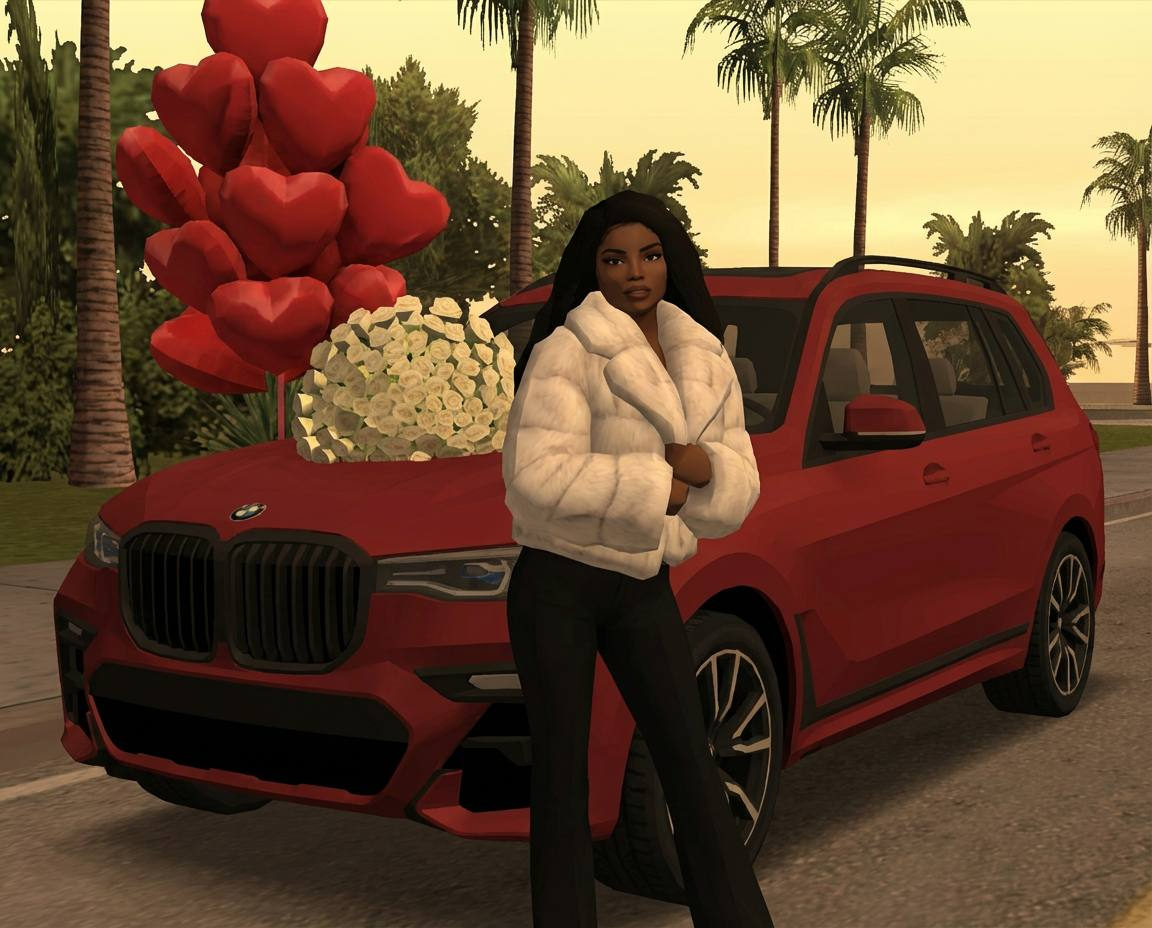
Prompt
"PRIMARY_DIRECTIVE": "Perform a STRICT. 1:1 SCENE-LOCKED STYLE TRANSFER. The input image is a FIXED SPATIAL BLUEPRINT. You MUST preserve object count, object type, object position, scale, and perspective exactly. You are NOT allowed to invent, relocate, duplicate, or delete any object. Only re-skin and re-mesh existing objects in-place." "SCENE_ANALYSIS_PHASE": { "mandatory_step": "First, segment the reference image into discrete object siots.", "rules": [ "Detect and label every visible object: buildings, people, vehicles, trees, poles, signs, ground, sky.", "Each detected object becomes a LOCKED SLOT with fixed position, size, and orientation.", "NO object may be generated outside these slots." "IDENTITY_LOCK": { "subject": "The person's face, hair, body proportions, pose, and exact clothing silhouette must be preserved 100%. Convert to a 2002-era low-poly digital character mesh WITHOUT altering likeness, outfit, or pose.", "aspect_ratio": "ABSOLUTE LOCK. Keep the original aspect ratio, camera angle, horizon line, and depth perspective exactly." } "VICE_CITY_RESKIN_LOGIC": { "method": "For EACH locked object slot, replace ONLY its material, texture, and mesh style with a GTA Vice City (2002) equivalent of the SAME OBJECT TYPE." "object_type_mapping": { "buildings": "Only replace existing building geometry with Vice City-style Art Deco buildings of the SAME footprint and height. Do NOT add new buildings or change skyline density.", "people": "Replace each detected person with a Vice City-era NPC occupying the EXACT same position, pose, and scale. No extra NPCs." "vehicles": "Replace each detected car or motorcycle with a Vice City vehicle of the SAME category and orientation. Do NOT add traffic.", "vegetation": "Replace each detected tree with a low-poly Vice City palm tree at the EXACT same trunk position and height.", "ground": "Re-skin the existing ground area using original Vice City asphalt, pavement, or sand textures only within the detected ground region." 3, "forbidden_behavior": [ "No filling empty space with Vice City assets" "No random Miami streets", "No skyline replacement", "No scene completion or extrapolation" ••• }, "LIGHTING_AND_COLOR_LOCK": { "rule": "Lighting must be Vice City-style BUT constrained to the original light direction, shadows, and time-of-day cues from the reference image.", "variants": { "sunset": "Apply orange-purple 80s haze WITHOUT changing shadow direction or contrast structure.", "night": "Apply neon pink/cyan rim lighting ONLY where existing light sources already affect the scene." } "TECHNICAL_RENDER_SPECS": { "engine": "RenderWare Engine (2002 authentic look)." "fidelity": "Mid-to-low poly geometry, visible edges, flat shading, low-resolution textures.", "hard_limits": [ "No ray tracing" "No modern global illumination", "No depth-of-field", "No motion blur", "No cinematic post-processing" "STRICT REJECTION CRITERIA L "NO SCENE REBUILD: Do not recreate the city from Vice City maps.", "NO OBJECT DRIFT: Objects must not slide, rotate, resize, or change depth." "NO BACKGROUND SWAP: Sky, horizon, and background structures must match the reference layout.", "NO Ul: No minimap, HUD, subtitles, health bars, or text." 1, "NEGATIVE_PROMPT": "random Vice City street, generic Miami, invented buildings, extra NPCs, added cars, GTA 5, ultra HD, realistic skin, cinematic lighting, bokeh, motion blur, new background, scene extrapolation"
✦ Use this prompt for free
About “Retro Vice Rebellion”
This portrait AI image prompt was created by AdX and is available to copy and use for free on PromptSpace. At 480 words, this is a detailed prompt that gives AI models precise instructions for generating the exact image you envision. It falls under the retro vintage, portrait, neon categories.
How to Use This Prompt
- 1
Copy the prompt
Click the “Copy Prompt” button above to copy the full prompt text to your clipboard.
- 2
Open your AI image generator
Open FLUX, Midjourney and paste the prompt into the text field.
- 3
Generate your image
Hit generate. For best results, use the default settings first and see how the output looks.
- 4
Experiment with variations
Change details like colors, lighting, or composition to make it uniquely yours.
- 5
Want your own face in the image?
Upload a clear, well-lit front-facing photo of yourself directly inside your AI tool (look for Image Reference, Face Swap, or IP-Adapter options) — then paste this prompt alongside it to generate images with your own face.
Recommended Settings
Aspect Ratio
2:3 (Portrait)
Quality
High / HD
Best For
FLUX, Midjourney
Style
Portrait
Why This Prompt Works
The high word count gives the model rich context, reducing ambiguity and producing more consistent results. The portrait aesthetic signals are specific enough that the model can lock onto a distinct visual language. Explicit lighting direction (a leading signal in prompt engineering) significantly improves photo-realism and composition. Well-crafted prompts like this one combine subject precision, style vocabulary, and rendering hints — the three pillars of reliable AI image generation.
Best Model
FLUX is strongly recommended for this prompt. FLUX 1.1 Pro excels at photorealism and handles complex lighting instructions more accurately than older models.