Soft daylight — AI Image Prompt
Prompt
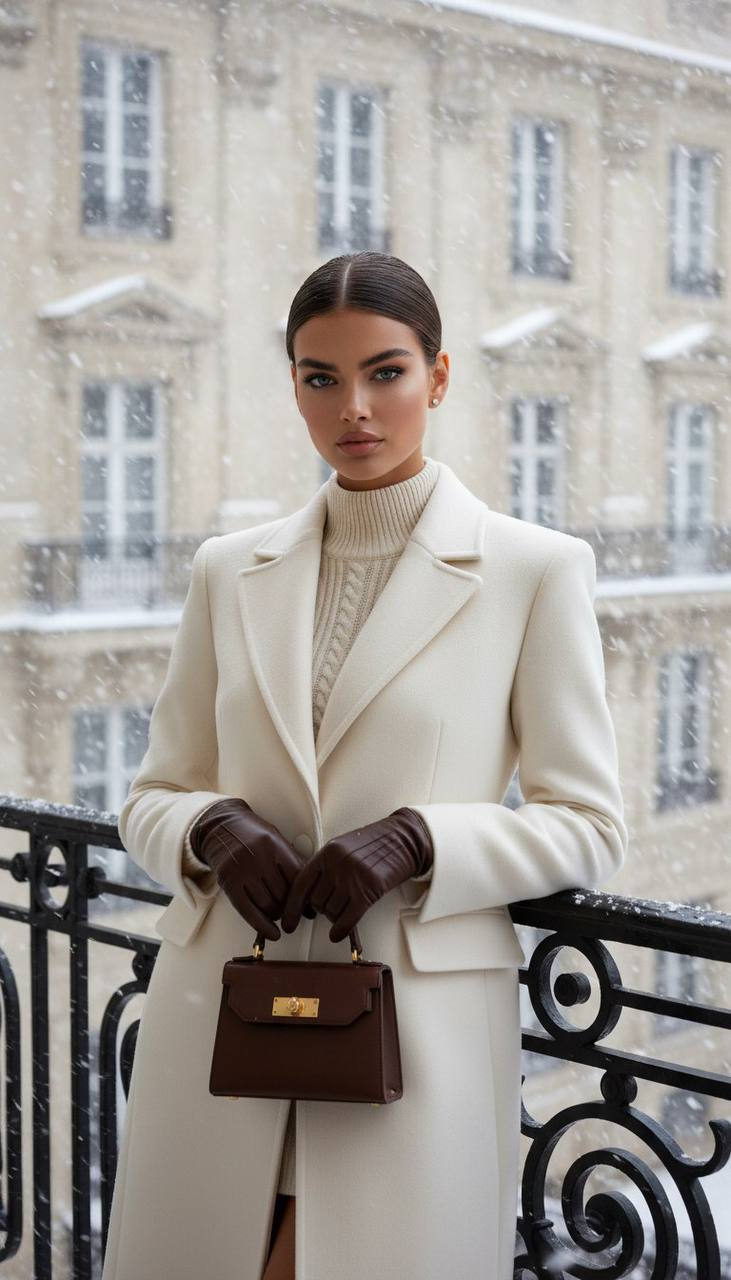
Using facial features and hair color identical to the attached reference (full 1:1 match), create a photorealistic medium shot (up to the knees). The young woman stands on a balcony with wrought black railings, against the backdrop of an old European facade with French windows. A real snowstorm is occurring — dense flows of snowflakes blurred by motion. She looks directly into the camera with a confident, calm, slightly elegant gaze. Her facial expression is refined and luxurious. Clothing Coat: — Cream-white premium wool coat, — Accentuated broad (structured) shoulders, — Perfect fit, — No accessories. Sweater: — Knitted, warm, matching the coat, — High neck, soft cashmere texture. Gloves: — Leather, bitter chocolate color, — Soft, natural shine of expensive leather. Bag: — Small structured leather bag, — Also bitter chocolate, — With noble gold hardware. Skin (very important) Skin should be: — Lively, natural, warm, — Even tone without blemishes, — Soft texture, slight natural porosity, — No blurring, plastic look, or “filter,” — Soft micro-shadows on cheekbones, temples, jawline, — Natural luxurious glow, — No harshly accentuated pores or defects. Hair and makeup — Hair pulled back into a neat smooth style, — Precise parting, nothing extraneous, — Light, premium makeup: focus on eyes, soft cheekbone correction. Lighting — Soft daylight, diffused, — Highlights fabric and skin textures, — Snowfall backlit and from above, creating depth and volume. Style — Fashion-gloss aesthetic, — Clean lines, high detail, — Premium fashion atmosphere, — 8K quality, ultra-realism.
✦ Use this prompt for free
About “Soft daylight”
This photorealistic, portrait AI image prompt was created by AdX and is available to copy and use for free on PromptSpace. At 248 words, this is a detailed prompt that gives AI models precise instructions for generating the exact image you envision. It falls under the day, winter, realistic categories.
How to Use This Prompt
- 1
Copy the prompt
Click the “Copy Prompt” button above to copy the full prompt text to your clipboard.
- 2
Open your AI image generator
Open FLUX, Midjourney and paste the prompt into the text field.
- 3
Generate your image
Hit generate. For best results, use the default settings first and see how the output looks.
- 4
Experiment with variations
Change details like colors, lighting, or composition to make it uniquely yours.
- 5
Want your own face in the image?
Upload a clear, well-lit front-facing photo of yourself directly inside your AI tool (look for Image Reference, Face Swap, or IP-Adapter options) — then paste this prompt alongside it to generate images with your own face.
Recommended Settings
Aspect Ratio
2:3 (Portrait)
Quality
High / HD
Best For
FLUX, Midjourney
Style
Photorealistic, Portrait
Why This Prompt Works
The high word count gives the model rich context, reducing ambiguity and producing more consistent results. The photorealistic and portrait aesthetic signals are specific enough that the model can lock onto a distinct visual language. Explicit lighting direction (a leading signal in prompt engineering) significantly improves photo-realism and composition. Well-crafted prompts like this one combine subject precision, style vocabulary, and rendering hints — the three pillars of reliable AI image generation.
Best Model
FLUX is strongly recommended for this prompt. FLUX 1.1 Pro excels at photorealism and handles complex lighting instructions more accurately than older models.