knitted sweater — AI Image Prompt
Prompt
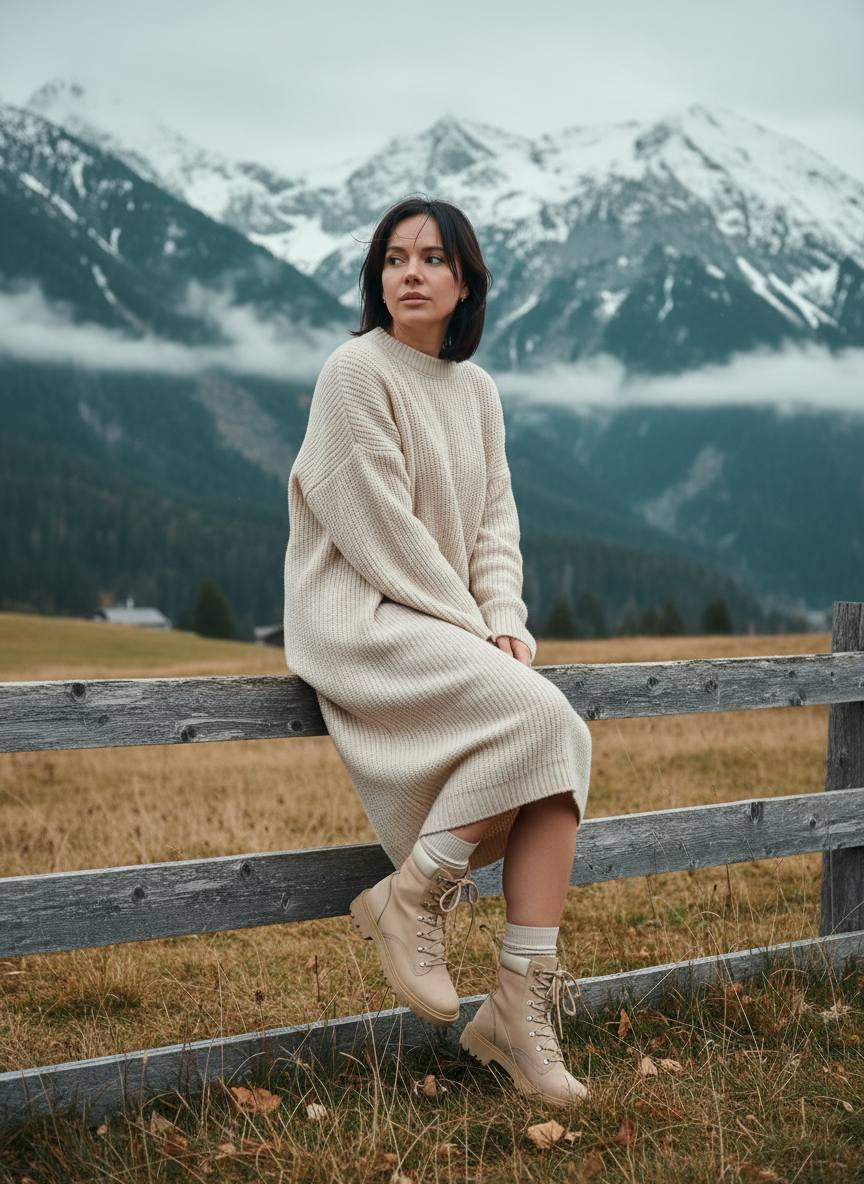
• Concept and mood: – Cinematic, calm, and slightly melancholic alpine portrait. The atmosphere of a cool, windy day in the mountains, a feeling of coziness and simplicity. • Location and environment: – Mountain landscape with snow-covered peaks in the background, a wooden old fence (weathered texture), a clearing with dried grass and soft autumn tones in the foreground. – Fog/clouds partially cover the peaks, but the shape of the mountains is readable — depth of frame and layers. • Composition and pose: – Vertical orientation (portrait format), frame in a 2:3 or 4:5 ratio. – The subject sits on the top rail of the fence in a semi-profile angle, the torso slightly turned toward the camera, the gaze directed to the side (out of frame) — a thoughtful, relaxed state. – Legs are bent, one leg slightly lowered down, boots against the grass background. Hands rest softly on the knees or hold the edge of the sweater. – Use the rule of thirds: the subject is shifted slightly left/right, the mountain horizon below the upper third. • Clothing and styling: – Voluminous knitted sweater dress in a cream/milky color with pronounced texture (chunky knit), midi length. – Beige/ivory boots in a trekking/military style with high socks in a light shade. – Minimalist accessories: small gold earrings or simple jewelry; natural, unobtrusive hair styling, slightly blowing in the wind. – Avoid bright brands/logos, clean natural tones. • Lighting and time of day: – Soft diffused light (overcast day or “golden hour” with light cloud cover) — avoid harsh shadows. – Slight back/rim light highlighting the silhouette and the texture of hair/knitted sweater. – If necessary, use a (warm) reflector or a weak fill flash to emphasize details in the foreground. • Technical shooting parameters: – Camera: full-frame sensor (for example, 35–50 MP). – Lens: portrait telephoto lens 85 mm–135 mm or a 70–200 mm zoom; optionally 50 mm for a wider context. – Aperture: f/1.8–f/2.8 for creamy bokeh and separation from the background (or f/2.8–f/4 for greater sharpness of the sweater + background). – ISO: 100–400 depending on lighting. – Shutter speed: 1/200–1/500 sec (to freeze slight wind movement). – White balance: auto / adjust for cold daylight (shift toward cool/neutral tones). • Post-processing / stylization: – Cinematic color grading: cool warm–cool contrasts — slightly cool dark areas (teal/green), neutral-warm skin tones and creamy sweaters. – Increase contrast and local clarity of the knit texture, slightly soften highlights. – Light vignette and subtle grain for a cinematic feel. – Exposure correction on the face and clothing details, selective work with shadows and highlights to convey depth. – Preserve natural skin and fabric texture, avoid excessive retouching. • Details for a generative prompt (short version, if needed for AI): – “Vertical portrait of a woman in a voluminous cream knitted sweater dress and beige trekking boots, sitting on an old wooden fence in the mountains with snow-covered peaks in the background, windy weather, soft diffused lighting, cinematic color grading, shallow depth of field, 85mm, f/2.0, high resolution, natural textures, minimalist accessories”. • Notes: – Avoid bright colors in the environment so that attention goes to the sweater texture and silhouette. – Shoot a series of frames with different apertures and angles: wide shot, medium shot, close-up on the texture of the sweater and boots. – Ensure safety and stability when sitting on the fence.
✦ Use this prompt for free
About “knitted sweater”
This photorealistic, portrait AI image prompt was created by AdX and is available to copy and use for free on PromptSpace. At 563 words, this is a detailed prompt that gives AI models precise instructions for generating the exact image you envision. It falls under the day, realistic, portrait categories.
How to Use This Prompt
- 1
Copy the prompt
Click the “Copy Prompt” button above to copy the full prompt text to your clipboard.
- 2
Open your AI image generator
Open FLUX, Midjourney and paste the prompt into the text field.
- 3
Generate your image
Hit generate. For best results, use the default settings first and see how the output looks.
- 4
Experiment with variations
Change details like colors, lighting, or composition to make it uniquely yours.
- 5
Want your own face in the image?
Upload a clear, well-lit front-facing photo of yourself directly inside your AI tool (look for Image Reference, Face Swap, or IP-Adapter options) — then paste this prompt alongside it to generate images with your own face.
Recommended Settings
Aspect Ratio
2:3 (Portrait)
Quality
High / HD
Best For
FLUX, Midjourney
Style
Photorealistic, Portrait
Why This Prompt Works
The high word count gives the model rich context, reducing ambiguity and producing more consistent results. The photorealistic and portrait aesthetic signals are specific enough that the model can lock onto a distinct visual language. Explicit lighting direction (a leading signal in prompt engineering) significantly improves photo-realism and composition. Well-crafted prompts like this one combine subject precision, style vocabulary, and rendering hints — the three pillars of reliable AI image generation.
Best Model
FLUX is strongly recommended for this prompt. FLUX 1.1 Pro excels at photorealism and handles complex lighting instructions more accurately than older models.
Common Failure Modes
Face distortion is the most common issue — enable 'face fix' or use --no deformed faces in Midjourney. Hands may also look unnatural; add 'perfect hands, detailed fingers' if body is included.
Prompt Variations to Try
- 1Cinematic version: Add "golden hour lighting, anamorphic lens, shallow depth of field, film grain" to shift the mood toward a movie still.
- 2Commercial-safe version: Replace stylized terms with "clean, minimalist, white background, product photography style" for brand or e-commerce use.
- 3Night version: Add "nighttime, neon lights, city reflections, low-light photography, f/1.4 aperture" to shift to night photography aesthetics.
Related Categories
This prompt is tagged with day, realistic, portrait, photography. Browse more prompts in these categories to find similar AI art styles and inspiration for your next creation.