Snow Voyage — AI Image Prompt
Prompt
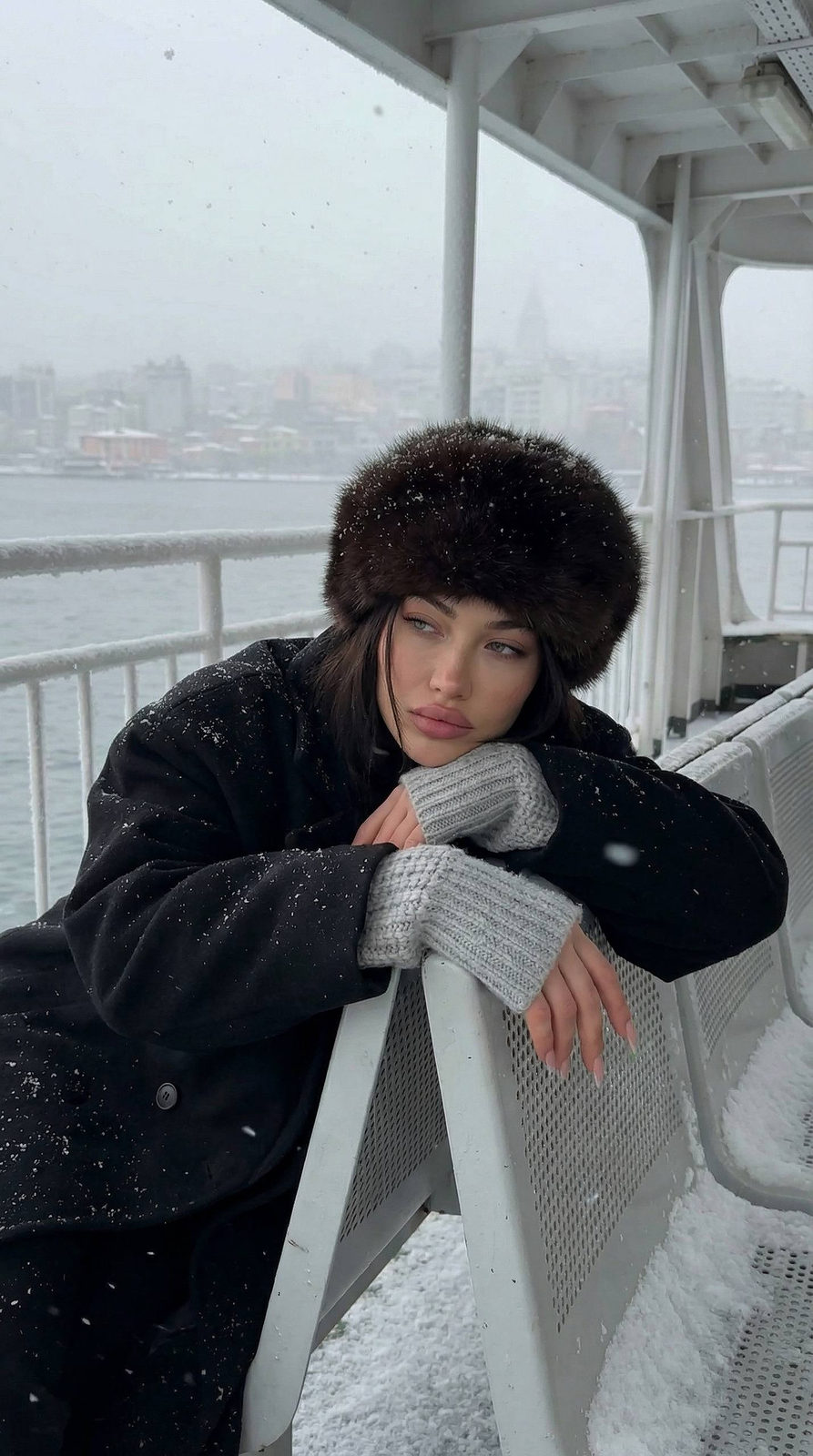
Reference image: conceptual variant. Cinematic winter portrait set on the upper deck of a ferry during heavy snowfall. The scene has a muted, cold-toned color palette with soft atmospheric haze. Snowflakes fall continuously, landing on the subject, the seats, and the metal railings. Background shows a blurred winter cityscape across the water, partially obscured by fog and snow. Subject: a woman leaning tiredly against the snowy ferry seat in front of her. Expression reflective, slightly melancholic, with soft makeup and natural lips. Hair mostly tucked inside a large, with thick volume. Face framed delicately by a few loose strands. Outfit: oversized black winter coat layered over chunky knitted sleeves in a light gray tone. The fabric appears dampened slightly by snow, adding realism. Long nails visible as she drapes one arm over the back of the seat and the other hangs loosely forward. Pose: slouched forward, both arms resting on the seat, body language relaxed but weary. Head slightly tilted, gaze off-camera, capturing a candid moment of stillness in harsh weather. Environment: rows of empty ferry seats covered in fresh snow, creating organic uneven patterns. Railings and deck structures coated lightly with frost. Snow and wind direction indicate a cold, open-water environment. Background includes a faint silhouette of a bridge or harbor structure softened by snowfall. Mood & style: atmospheric, documentary-like, winter urban solitude aesthetic. Natural ambient lighting, soft shadows, subtle grain, a sense of cold and motion. 8K realism with cinematic storytelling.
✦ Use this prompt for free
About “Snow Voyage”
This photorealistic, cinematic, portrait AI image prompt was created by AdX and is available to copy and use for free on PromptSpace. At 243 words, this is a detailed prompt that gives AI models precise instructions for generating the exact image you envision. It falls under the realistic, cinematic, portrait categories.
How to Use This Prompt
- 1
Copy the prompt
Click the “Copy Prompt” button above to copy the full prompt text to your clipboard.
- 2
Open your AI image generator
Open FLUX, Midjourney and paste the prompt into the text field.
- 3
Generate your image
Hit generate. For best results, use the default settings first and see how the output looks.
- 4
Experiment with variations
Change details like colors, lighting, or composition to make it uniquely yours.
- 5
Want your own face in the image?
Upload a clear, well-lit front-facing photo of yourself directly inside your AI tool (look for Image Reference, Face Swap, or IP-Adapter options) — then paste this prompt alongside it to generate images with your own face.
Recommended Settings
Aspect Ratio
2:3 (Portrait)
Quality
High / HD
Best For
FLUX, Midjourney
Style
Photorealistic, Cinematic, Portrait
Why This Prompt Works
The high word count gives the model rich context, reducing ambiguity and producing more consistent results. The photorealistic and cinematic aesthetic signals are specific enough that the model can lock onto a distinct visual language. Explicit lighting direction (a leading signal in prompt engineering) significantly improves photo-realism and composition. Well-crafted prompts like this one combine subject precision, style vocabulary, and rendering hints — the three pillars of reliable AI image generation.
Best Model
FLUX is strongly recommended for this prompt. FLUX 1.1 Pro excels at photorealism and handles complex lighting instructions more accurately than older models.
Common Failure Modes
Face distortion is the most common issue — enable 'face fix' or use --no deformed faces in Midjourney. Hands may also look unnatural; add 'perfect hands, detailed fingers' if body is included.
Prompt Variations to Try
- 1Cinematic version: Add "golden hour lighting, anamorphic lens, shallow depth of field, film grain" to shift the mood toward a movie still.
- 2Commercial-safe version: Replace stylized terms with "clean, minimalist, white background, product photography style" for brand or e-commerce use.
- 3Night version: Add "nighttime, neon lights, city reflections, low-light photography, f/1.4 aperture" to shift to night photography aesthetics.
Related Categories
This prompt is tagged with realistic, cinematic, portrait, vibrant colorful, elegant. Browse more prompts in these categories to find similar AI art styles and inspiration for your next creation.