Overcast Turquoise Bridge — AI Image Prompt
Prompt
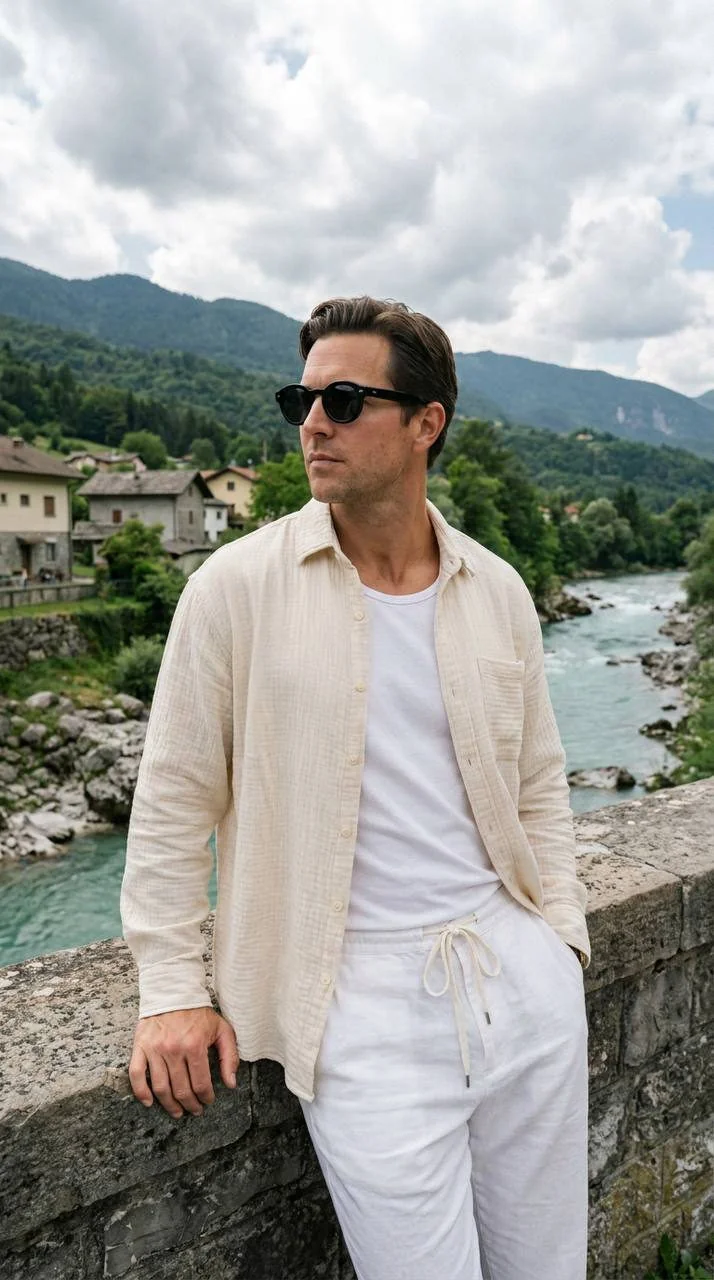
Preserve the exact facial features, proportions, and identity from the reference image. Do not change the face shape, eyes, nose, mouth, skin texture, or facial expression. Preserve the identity from the reference image. The face must match the reference image 1:1. [FRAMING AND CAMERA ANGLE] Waist-up shot. Camera at chest level, straight-on angle. 35mm lens, providing high background detail and spatial depth. [POSE] Torso turned frontally, back slightly leaning against the stone railing of the bridge. Head turned in profile, gaze directed to the side (to the left of the camera). Calm facial expression. Right arm relaxed, palm resting on the parapet. Left arm bent, thumb tucked into the trouser pocket. Legs positioned naturally, left thigh slightly extended forward. [CLOTHING] A loose oversized shirt made of textured cotton or linen in a light cream (ivory) color is worn over a basic white T-shirt. The shirt is completely unbuttoned, with a chest pocket visible on the left side. Trousers made of lightweight white fabric with a drawstring waist (white ties visible at the waistband), loose fit. [JEWELRY AND ACCESSORIES] Sunglasses with a massive, rounded black frame and dark lenses. [SKIN] Lifelike skin texture with natural relief. An even, light tan. Natural veins and joints visible on the hands; soft folds on the neck as the head turns. No plastic appearance or artificial smoothing. [BACKGROUND] View from a bridge overlooking a mountain river with turquoise water and a rocky shore. Dense green vegetation and low residential houses with tiled roofs line the riverbanks. In the distance are majestic forest-covered mountains with hazy peaks. The sky is covered with voluminous white and light-gray clouds, creating soft diffused light. Deep, sharp background. [LIGHTING] Natural daylight in overcast weather. Diffused, soft light without harsh shadows. Light source from above and in front. Neutral light tone, slightly cool due to the cloud cover. Soft shadows emphasize the folds of the loose clothing. [COLOR GRADING] Light, airy color palette. White, cream, green, and delicate blue dominate. Moderate contrast. Neutral shadows. Mandatory Fuji 400H film grain for natural rendering of nature tones. [TECHNICAL PARAMETERS] Shot on: 35mm, f/4.0, RAW, unretouched photorealism. Travel documentary style. –ar 9:16
About “Overcast Turquoise Bridge”
This photorealistic, fashion, portrait AI image prompt was created by PromptSpace and is available to copy and use for free on PromptSpace. At 358 words, this is a detailed prompt that gives AI models precise instructions for generating the exact image you envision. It falls under the realistic, photography, portrait categories.
How to Use This Prompt
- 1
Copy the prompt
Click the “Copy Prompt” button above to copy the full prompt text to your clipboard.
- 2
Open your AI image generator
Open FLUX, Midjourney and paste the prompt into the text field.
- 3
Generate your image
Hit generate. For best results, use the default settings first and see how the output looks.
- 4
Experiment with variations
Change details like colors, lighting, or composition to make it uniquely yours.
- 5
Want your own face in the image?
Upload a clear, well-lit front-facing photo of yourself directly inside your AI tool (look for Image Reference, Face Swap, or IP-Adapter options) — then paste this prompt alongside it to generate images with your own face.
Recommended Settings
Aspect Ratio
2:3 (Portrait)
Quality
High / HD
Best For
FLUX, Midjourney
Style
Photorealistic, Fashion, Portrait
Why This Prompt Works
The high word count gives the model rich context, reducing ambiguity and producing more consistent results. The photorealistic and fashion aesthetic signals are specific enough that the model can lock onto a distinct visual language. Explicit lighting direction (a leading signal in prompt engineering) significantly improves photo-realism and composition. Well-crafted prompts like this one combine subject precision, style vocabulary, and rendering hints — the three pillars of reliable AI image generation.
Best Model
FLUX is strongly recommended for this prompt. FLUX 1.1 Pro excels at photorealism and handles complex lighting instructions more accurately than older models.
Common Failure Modes
Face distortion is the most common issue — enable 'face fix' or use --no deformed faces in Midjourney. Hands may also look unnatural; add 'perfect hands, detailed fingers' if body is included.
Prompt Variations to Try
- 1Cinematic version: Add "golden hour lighting, anamorphic lens, shallow depth of field, film grain" to shift the mood toward a movie still.
- 2Commercial-safe version: Replace stylized terms with "clean, minimalist, white background, product photography style" for brand or e-commerce use.
- 3Night version: Add "nighttime, neon lights, city reflections, low-light photography, f/1.4 aperture" to shift to night photography aesthetics.
Related Categories
This prompt is tagged with realistic, photography, portrait, fashion, day. Browse more prompts in these categories to find similar AI art styles and inspiration for your next creation.