Muted Hair-Touch Selfie — AI Image Prompt
Prompt
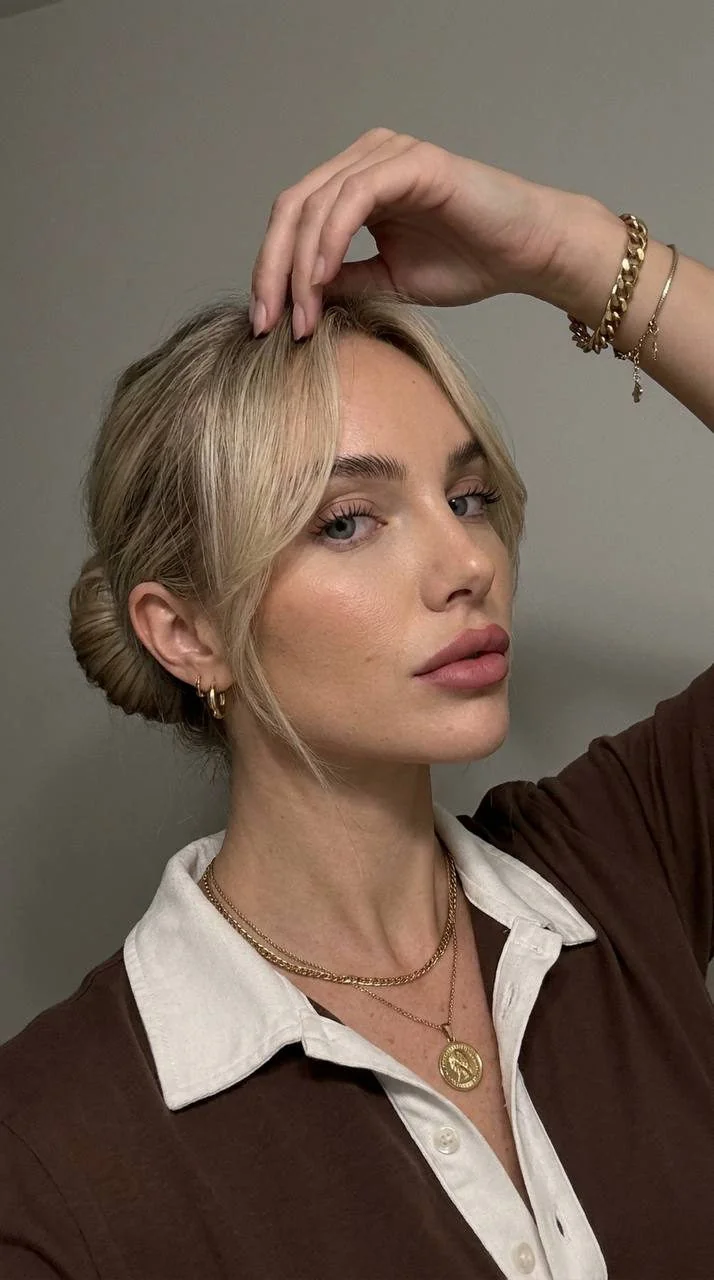
Do not change the girl's appearance from the photo. Create a realistic image, a selfie taken with the front-facing camera of an iPhone; the phone is not visible in the frame. Camera angle: The shot is taken from slightly below. The girl is in a three-quarter pose toward the camera, with her body turned slightly to the right while her gaze is directed straight into the camera. Pose: The girl is standing with her head slightly tilted sideways toward her shoulder. Her right hand is raised to her head, with her fingers delicately touching the hair near her forehead. Bracelets are visible on the wrist of the same hand. Expression: Her face is calm, confident, and slightly mysterious. Her gaze is direct and piercing. Hair: Long hair gathered at the back into a neat hairstyle (a bun), while soft strands with bangs are left loose at the front and sides of the face, framing the cheekbones. Makeup: Neat, well-groomed eyebrows with a lamination effect, long eyelashes with a wet-look effect, lips painted with matte dusty-rose lipstick using a red tint. Clothing: A brown polo shirt with a contrasting white turn-down collar and a button placket. Jewelry: A delicate gold chain with a round pendant medallion and a second thin chain around her neck. Small, neat earrings in her ears. Two bracelets on her right wrist: a substantial gold chain bracelet and a thinner bracelet with a pendant. Background: A plain neutral gray wall, with dim indoor lighting. Photorealism, high detail in the skin, fabric, and props. A photo captured in motion. Image quality like an iPhone 17: slight digital noise, soft sharpness, reduced exposure, slight graininess, and the effect of a lifelike candid frame. Aspect ratio: 3:4.
About “Muted Hair-Touch Selfie”
This photorealistic, portrait AI image prompt was created by PromptSpace and is available to copy and use for free on PromptSpace. At 287 words, this is a detailed prompt that gives AI models precise instructions for generating the exact image you envision. It falls under the realistic, photography, portrait categories.
How to Use This Prompt
- 1
Copy the prompt
Click the “Copy Prompt” button above to copy the full prompt text to your clipboard.
- 2
Open your AI image generator
Open FLUX, Midjourney and paste the prompt into the text field.
- 3
Generate your image
Hit generate. For best results, use the default settings first and see how the output looks.
- 4
Experiment with variations
Change details like colors, lighting, or composition to make it uniquely yours.
- 5
Want your own face in the image?
Upload a clear, well-lit front-facing photo of yourself directly inside your AI tool (look for Image Reference, Face Swap, or IP-Adapter options) — then paste this prompt alongside it to generate images with your own face.
Recommended Settings
Aspect Ratio
2:3 (Portrait)
Quality
High / HD
Best For
FLUX, Midjourney
Style
Photorealistic, Portrait
Why This Prompt Works
The high word count gives the model rich context, reducing ambiguity and producing more consistent results. The photorealistic and portrait aesthetic signals are specific enough that the model can lock onto a distinct visual language. Explicit lighting direction (a leading signal in prompt engineering) significantly improves photo-realism and composition. Well-crafted prompts like this one combine subject precision, style vocabulary, and rendering hints — the three pillars of reliable AI image generation.
Best Model
FLUX is strongly recommended for this prompt. FLUX 1.1 Pro excels at photorealism and handles complex lighting instructions more accurately than older models.
Common Failure Modes
Face distortion is the most common issue — enable 'face fix' or use --no deformed faces in Midjourney. Hands may also look unnatural; add 'perfect hands, detailed fingers' if body is included.
Prompt Variations to Try
- 1Cinematic version: Add "golden hour lighting, anamorphic lens, shallow depth of field, film grain" to shift the mood toward a movie still.
- 2Commercial-safe version: Replace stylized terms with "clean, minimalist, white background, product photography style" for brand or e-commerce use.
- 3Night version: Add "nighttime, neon lights, city reflections, low-light photography, f/1.4 aperture" to shift to night photography aesthetics.
Related Categories
This prompt is tagged with realistic, photography, portrait, selfie. Browse more prompts in these categories to find similar AI art styles and inspiration for your next creation.