Crimson Warning Signal — AI Image Prompt
Prompt
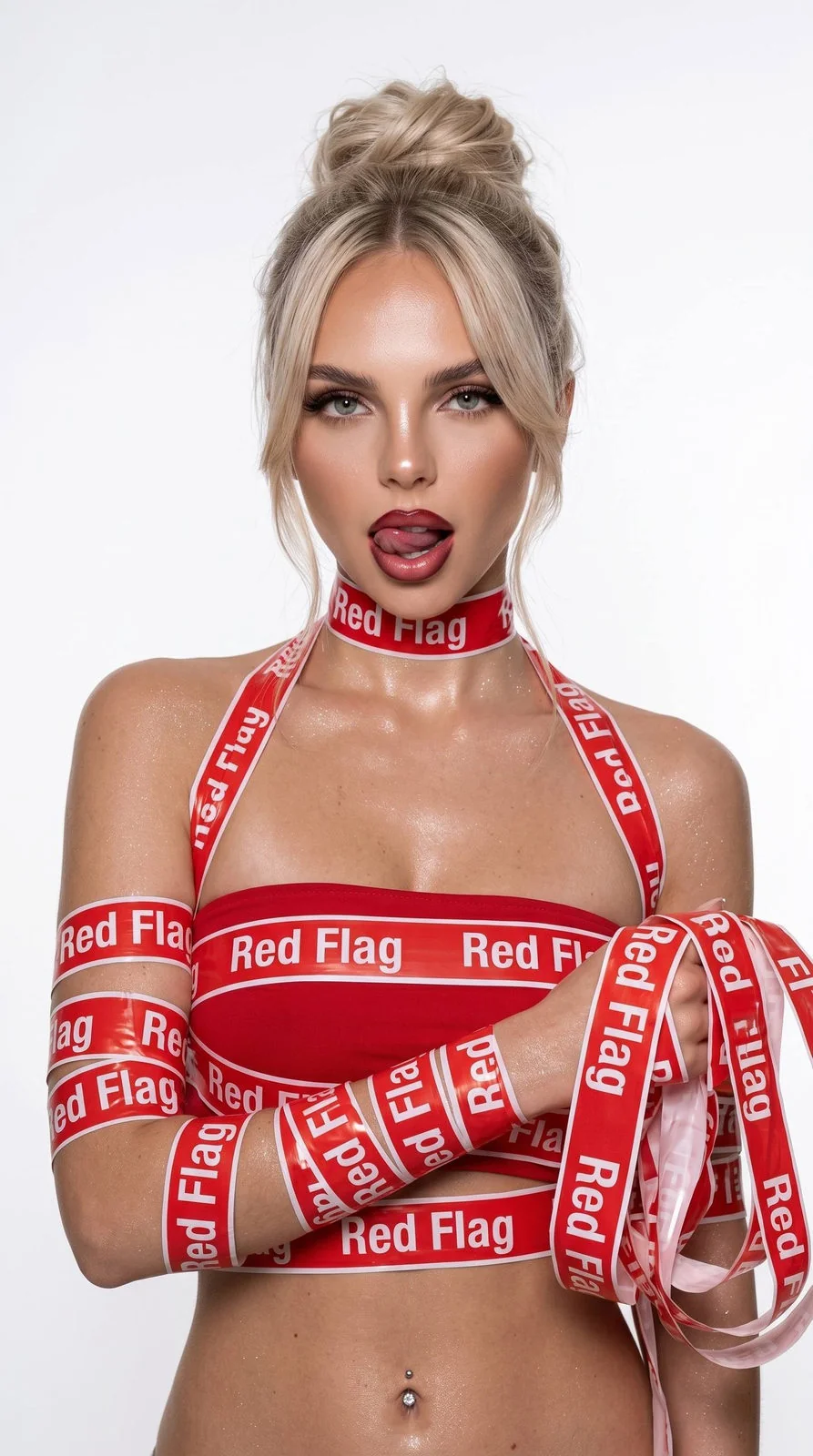
Изобрази портрет этой девушки не меняя её внешность, черты лица и цвет волос даже на 1%. Студийное фото, слегка холодный фильтр, фон белый без деталей. Близкий портрет девушки по пояс. Её волосы очень длинные слегка накручены на Дайсон, излучая грациозный вид собраны в небрежный пучок, челка шторка по бокам на удлинение придает шарма. Кожа женщины реалистична, не выдает ai эффектов, ее кожа выглядит естественно, с ровным, здоровым тоном и эффектом влажного сияния, без ai look, лёгкий контуринг скул и носа, глаза с ресницами в лисьем эффекте, хайлайтер на скулах, губы очень пухлые, естественные, с блеском, а брови уложены с эффектом ламинирования. На губах омбре Бордо-красные, легкий хайлайтер на скулах и блестящий шимер в открытых участках по телу, аккуратный контуринг, аккуратные стрелки. Руки девушки вокруг обвиты в красную сигнальную ленту ленту(неё полностью кожу рук видно) на которой белым написано слово - “Red Flag”, именно так, не меняй. Такие слова идут подряд, лента красно белая. На девушки красный топ без лямок Эта же лента переметывает девушки этот топ множественными слоями. так же эта лента вокруг шеи завязана как чокер, плечевая зона и ключици так же с лентой. Девушка стройная, стоит ровно смотрит в камеру, взгляд дерзкий, слегка высунула язык. Инстаграмный стиль с слегка холодным фильтром, легкая зернистость на фото. Деталезированная кожа и волосы. Фото строго до пояса, пупок проколот, одна рука согнута в локте держит много такой же ленты.
About “Crimson Warning Signal”
This photorealistic, fashion, portrait AI image prompt was created by PromptSpace and is available to copy and use for free on PromptSpace. At 227 words, this is a detailed prompt that gives AI models precise instructions for generating the exact image you envision. It falls under the realistic, fashion, portrait categories.
How to Use This Prompt
- 1
Copy the prompt
Click the “Copy Prompt” button above to copy the full prompt text to your clipboard.
- 2
Open your AI image generator
Open FLUX, Midjourney and paste the prompt into the text field.
- 3
Generate your image
Hit generate. For best results, use the default settings first and see how the output looks.
- 4
Experiment with variations
Change details like colors, lighting, or composition to make it uniquely yours.
- 5
Want your own face in the image?
Upload a clear, well-lit front-facing photo of yourself directly inside your AI tool (look for Image Reference, Face Swap, or IP-Adapter options) — then paste this prompt alongside it to generate images with your own face.
Recommended Settings
Aspect Ratio
2:3 (Portrait)
Quality
High / HD
Best For
FLUX, Midjourney
Style
Photorealistic, Fashion, Portrait
Why This Prompt Works
The high word count gives the model rich context, reducing ambiguity and producing more consistent results. The photorealistic and fashion aesthetic signals are specific enough that the model can lock onto a distinct visual language. Well-crafted prompts like this one combine subject precision, style vocabulary, and rendering hints — the three pillars of reliable AI image generation.
Best Model
FLUX is strongly recommended for this prompt. FLUX 1.1 Pro excels at photorealism and handles complex lighting instructions more accurately than older models.
Common Failure Modes
Face distortion is the most common issue — enable 'face fix' or use --no deformed faces in Midjourney. Hands may also look unnatural; add 'perfect hands, detailed fingers' if body is included.
Prompt Variations to Try
- 1Cinematic version: Add "golden hour lighting, anamorphic lens, shallow depth of field, film grain" to shift the mood toward a movie still.
- 2Commercial-safe version: Replace stylized terms with "clean, minimalist, white background, product photography style" for brand or e-commerce use.
- 3Night version: Add "nighttime, neon lights, city reflections, low-light photography, f/1.4 aperture" to shift to night photography aesthetics.
Related Categories
This prompt is tagged with realistic, fashion, portrait, studio, vibrant colorful. Browse more prompts in these categories to find similar AI art styles and inspiration for your next creation.