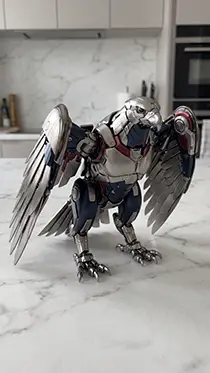
Mechanical Toy Creator
Subject — Mechanical Pod — Transformer-Style Reveal Get 6 related models with ready-to-use image and video prompts for viral AI shorts.
Starter prompt
Use the PromptSpace skill PS50 (mechanical-toy-creator) from https://www.promptspace.in/skills-library/mechanical-toy-creator. Ask me for the inputs the skill lists, then follow its documented procedure and output format.
Paste this into Claude, ChatGPT, Gemini or any supported agent. It references the public skill URL above.
Paste this one line into any agent that has the PromptSpace MCP connected. The agent will fetch the full skill, ask for the inputs it needs, then follow the procedure. See MCP setup if you haven't connected yet.
Full skill content
Mechanical Toy Creator
Subject — Mechanical Pod — Transformer-Style Reveal Get 6 related models with ready-to-use image and video prompts for viral AI shorts.
What this skill does
Mechanical Toy Creator is a PromptSpace agent skill (PS50) that an MCP-connected AI assistant uses to generate finished, ready-to-paste prompts you can drop straight into AI Shorts workflows. It encodes the full recipe — inputs, structure, output format — so you never have to re-prompt from scratch.
How to run it
- Connect the PromptSpace MCP once in your AI assistant (Claude Desktop, ChatGPT with Developer mode, Claude Code, Hermes, Cursor, or Codex). The one-line connector URL is
https://www.promptspace.in/mcp— no sign-in, no API key. - In any chat, paste this starter prompt:
Use the PromptSpace skill PS50 (mechanical-toy-creator) from https://www.promptspace.in/skills-library/mechanical-toy-creator. Ask me for the inputs the skill lists, then follow its documented procedure and output format.
- The agent will fetch this skill, ask you for the inputs it needs (subject, duration, style, platform, etc.), then return the finished prompts shot-by-shot or image-by-image, in the exact format the format expects.
Compatibility
Works with every MCP-compatible AI assistant: Claude, ChatGPT, Gemini, Hermes, Cursor, Codex. The skill is model-agnostic — same output quality whether you drive it with Claude 3.7, GPT-5, Gemini 2.5 Pro or a self-hosted Hermes 4.
Category and tags
Primary category: AI Shorts. Also appears in: DIY & Crafts, Oddly Satisfying.
Topic tags: diy & crafts.
License and attribution
Free and licensed under CC-BY-4.0. Keep an attribution link back to promptspace.in/skills-library/mechanical-toy-creator when you redistribute or embed the output in a public project.
Install into your agent
Claude Desktop (recommended)
One-click deep link to pre-fill the connector:
Add PromptSpace MCP to ClaudeThen paste the starter prompt above in any chat.
Claude Code (terminal)
Add the connector once:
claude mcp add --transport http promptspace https://www.promptspace.in/mcpOr add to .mcp.json:
{
  "mcpServers": {
    "promptspace": {
      "type": "http",
      "url": "https://www.promptspace.in/mcp"
    }
  }
}
ChatGPT (Developer mode)
Settings → Security and login → turn on Developer mode. Then open chatgpt.com/plugins → + → name it PromptSpace → paste https://www.promptspace.in/mcp → No authentication → Create.
Hermes / Cursor / Codex (SKILL.md)
These agents also accept a raw SKILL.md directly. Save the content above under .cursor/rules/mechanical-toy-creator.mdc, .claude/skills/mechanical-toy-creator.md, or the Hermes profile skills directory, and the agent will pick it up on next session.
Download
View raw JSON (incl. SKILL.md body)Licensed under CC-BY-4.0. Keep attribution to PromptSpace when redistributing.