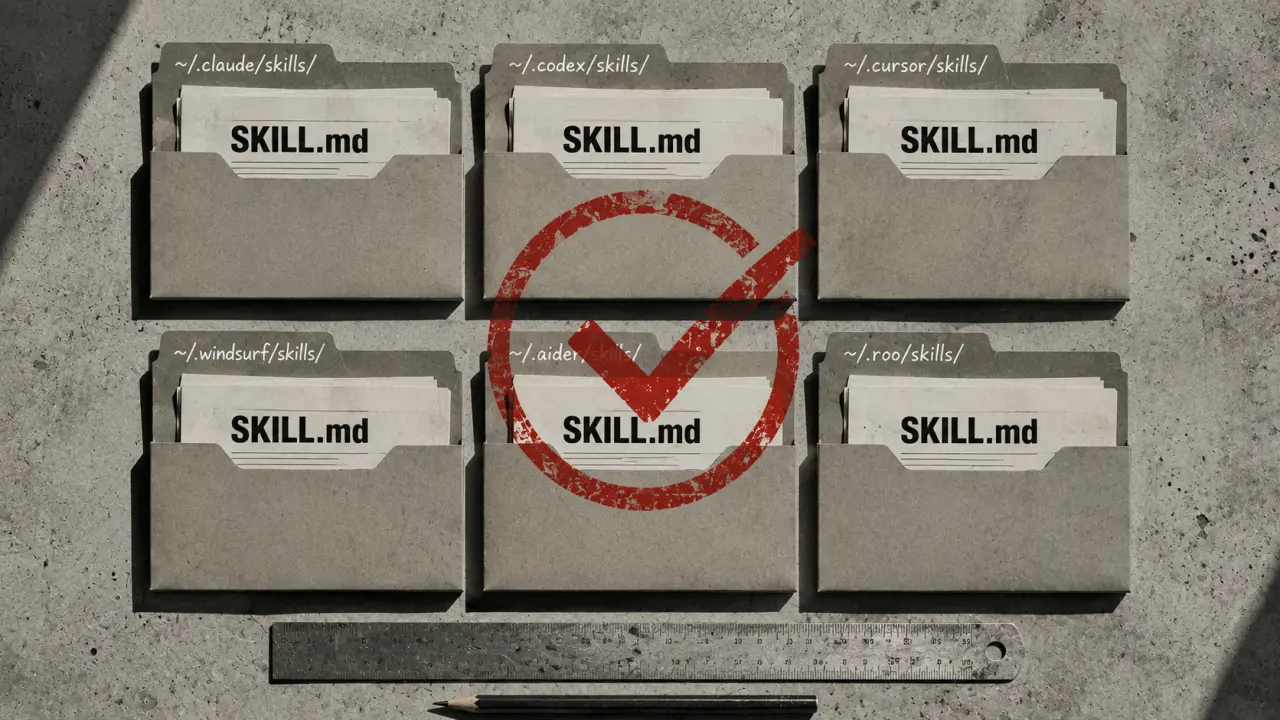
A skill is a set of instructions packaged as a SKILL.md file that an AI agent reads to learn a new workflow. Quick Answer: Claude Code stores skills in two locations: `~/.claude/skills/` for personal skills (available across all projects) and `.claude/skills/` for project-scoped skills (committed to the repo). On macOS, Linux, and Windows the paths are the same — `~` resolves to `/Users/you`, `/home/you`, or `C:\Users\you`. Claude Desktop uses the same `~/.claude/skills/` path. One of the most common questions from developers new to AI agent skills is: where do the skills actually go? Each agent stores them in a slightly different location, and understanding the directory structure helps with installing, debugging, and organizing your skills.
Where does Claude Code store skills?
Claude Code stores skills in two places: Personal skills live at `~/.claude/skills/`. Every skill you put here is available across all your projects. This is where most individually installed skills go. Project-scoped skills are stored inside the project directory under `.claude/skills/`. These skills are committed to your version control system alongside your code, making it easy to share specific workflows with your team or preserve them for future reference.Understanding the Directory Structure
The personal skills directory (`~/.claude/skills/`) is a hidden folder in your home directory. On Unix-based systems (macOS, Linux), this path is straightforward: `/Users/yourname/.claude/skills/` or `/home/yourname/.claude/skills/`. On Windows, the equivalent is typically `C:\Users\yourname\.claude\skills\`. This directory is designed to hold reusable skill files that you want accessible globally across all your projects. The project-scoped skills folder `.claude/skills/` is located inside your project root directory. Because it is part of your project’s repo, it should be committed to git or your preferred version control system. This makes these skills portable and shareable with collaborators working on the same codebase.Practical Example: Adding a Personal Skill
1. Locate your home directory on your OS. For example, on macOS, open Terminal and type `cd ~`. 2. Navigate to `.claude/skills/` by running `cd ~/.claude/skills/`. 3. Create a new folder for your skill, e.g., `mkdir my-new-skill`. 4. Inside this new folder, add your `SKILL.md` file with the workflow instructions. 5. Restart Claude Code or reload skills to ensure it picks up your new skill.After these steps, your new skill will be available in every project that uses Claude Code on your machine.
Practical Example: Adding a Project-Scoped Skill
1. Open your project directory. 2. If the `.claude/skills/` folder doesn’t exist, create it: `mkdir -p .claude/skills/`. 3. Inside `.claude/skills/`, create a folder for your skill (e.g., `custom-skill`). 4. Add your `SKILL.md` file with the instructions. 5. Commit the `.claude/skills/custom-skill/SKILL.md` file to your git repository.This way, when other developers clone your project, they will have access to the exact skills needed for the project’s workflows.
Tips for Managing Claude Skills
- Keep personal skills for generic utilities and workflows you use across many projects. - Use project-scoped skills for workflows specific to a given codebase or client. - Regularly back up your personal skills folder to avoid losing custom workflows. - Use descriptive folder and skill names to make skills easy to find and understand. - When updating project-scoped skills, communicate changes with your team to avoid confusion.Where Do Other AI Coding Agents Store Skills?
Understanding Claude Code’s skill storage is a good start, but what about other agents like OpenClaw, Codex CLI, or Cursor? Here’s a quick overview: OpenClaw typically stores skills in the `.openclaw/skills/` folder inside the project directory, similar to Claude’s project-scoped skills. Personal skills can be found in the home directory under `~/.openclaw/skills/`. Codex CLI stores user-defined skills in `~/.codex/skills/` for personal usage and inside the project folder `.codex/skills/` for project-specific skills. This consistent structure makes it easy to switch between agents. Cursor stores skills inside the `.cursor/skills/` directory within the project. It also supports a global skills path at `~/.cursor/skills/` for skills that should persist across projects.Real-World Use Cases
Use Case 1: Sharing Custom Workflows in a Team
Imagine a team working on a web application that uses Claude Code. The team has built several custom skills to automate code formatting, linting, and deployment steps. By placing these skills in the project-scoped `.claude/skills/` directory and committing them to git, everyone on the team can access the same automated workflows without manually installing or configuring anything.Use Case 2: Personal Productivity Boost
A developer frequently uses a skill to generate unit test templates. By storing this skill in the personal skills directory (`~/.claude/skills/`), it becomes available in all projects without duplication. This saves time and keeps workflows consistent.Use Case 3: Debugging Skill Loading Issues
If a skill isn’t working as expected, knowing the exact file path helps troubleshoot. For example, you can verify the presence of `SKILL.md` in `~/.claude/skills/my-skill/` or `.claude/skills/my-skill/`. Checking file permissions and content correctness can resolve many issues.Summary
Claude Code and similar AI coding agents organize skills in both personal and project-scoped directories. Personal skills in `~/.claude/skills/` provide a global repository of workflows, while project-scoped skills inside `.claude/skills/` are ideal for sharing and versioning with your team. Understanding these paths is crucial for efficient skill management, collaboration, and troubleshooting. By following the practical steps and tips outlined here, you can harness the full power of AI agent skills in your development workflow.Frequently Asked Questions
Are these prompts free? Yes — all PromptSpace prompts are free to copy and use. Browse our ChatGPT Prompts library for hundreds more.Do these work on the free tier? Most work on free tiers. Complex prompts may perform better on paid versions (ChatGPT Plus, Claude Pro) with larger context windows.
How do I get better AI results? Be specific: include your role, desired format, target audience, and any constraints. More context always improves output.
Can I modify these prompts for my use case? Absolutely — treat every prompt as a starting template. Customize the role, topic, tone, and format to match your needs.